التحديثات
تحديثات وتحسينات جديدة في إيديانوت.
شكراً لك! تم استلام طلبك!
عذرًا! حدث خطأ أثناء إرسال النموذج.
- Updated magazine view PDF export by boosting rendering resources and adding a timeout so downloads complete reliably.
- Fixed idea forms from shareable links failing to load when the inbox phase is hidden.
- Fixed idea like counters so each user counts once and comment likes no longer inflate totals.
- Fixed the “phase hidden” tooltip text showing the wrong substitution.
- Fixed Magazine View Idea Export.
- Added clearer contrast on idea collection card action buttons so likes and menu controls stand out in detail view.
- Updated the idea collection template editor to always show its idea fields when adjusting layout settings.
- Changed new-idea notifications for followed idea collections to only include people with direct full access, preventing extra alerts from indirect sharing.
- Fixed widget required indicators so checkmarks only show as required when at least one selection is needed, and required text fields display the proper marker.
- Various bug fixes.
- Added full rich text/WYSIWYG editing support across text fields on the platform, such as for idea collection details, comments, long text form fields, and many others. You can enable the rich text toolbar as a setting for text fields.
- Added automation actions that can create, update, and delete form entries.
- Added new "Email" and "Phone" form fields, complete with domain and country restrictions plus automation bindings so follow-up messages use clean, validated contact details.
- "Send Email" automation actions now support adding external email addresses as receivers in combination with the existing filter for existing users.
- Improved cycle-detection and self-referential loops inside Dynamic Expressions
- Fixed and improved PDF exports for Magazine Views
- Fixed the Microsoft Teams workspace experience so interface text follows the workspace language instead of mixing locales.
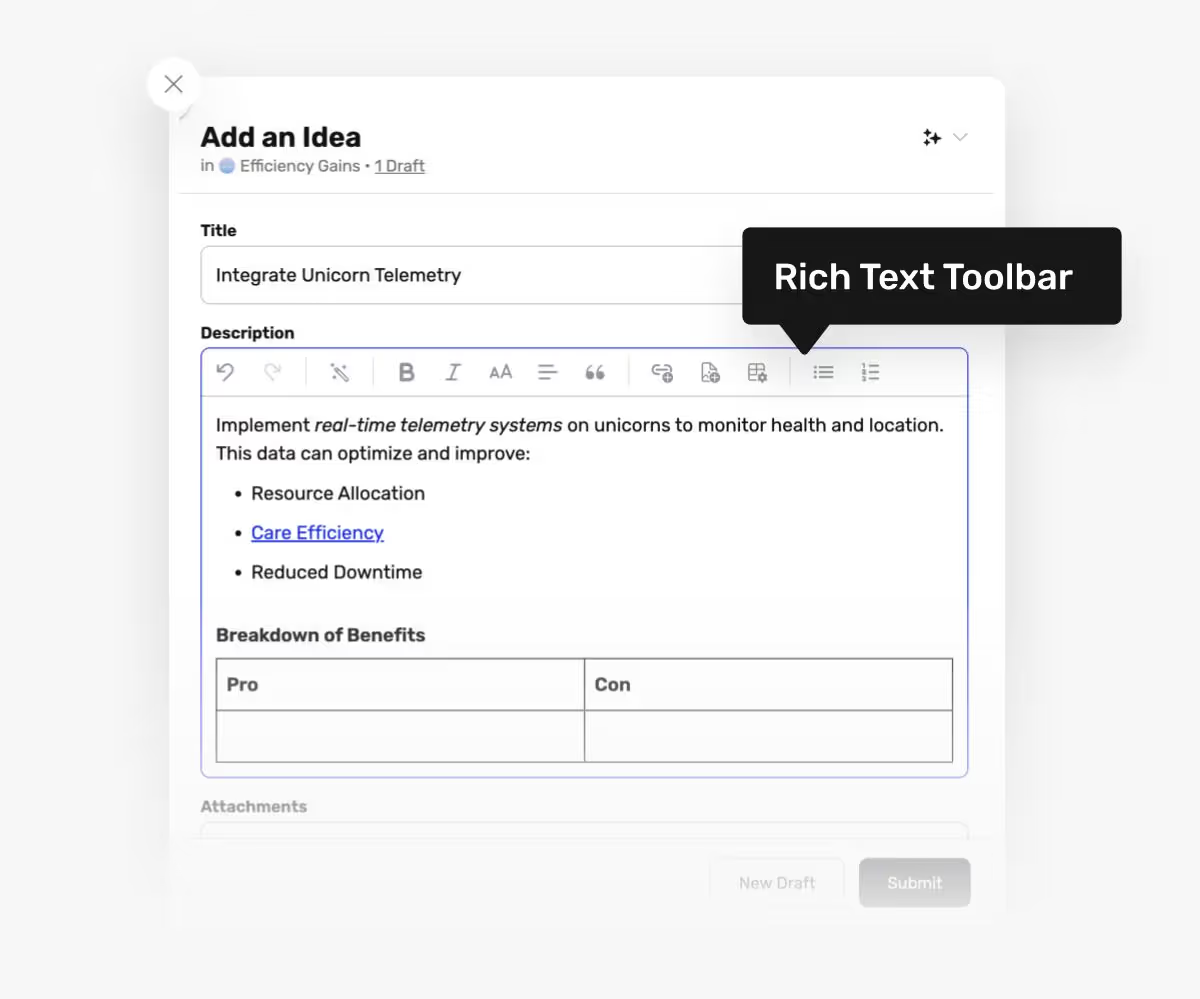
Let people edit and style their ideas. Easy editing of rich content in ideas and Idea Collection descriptions.
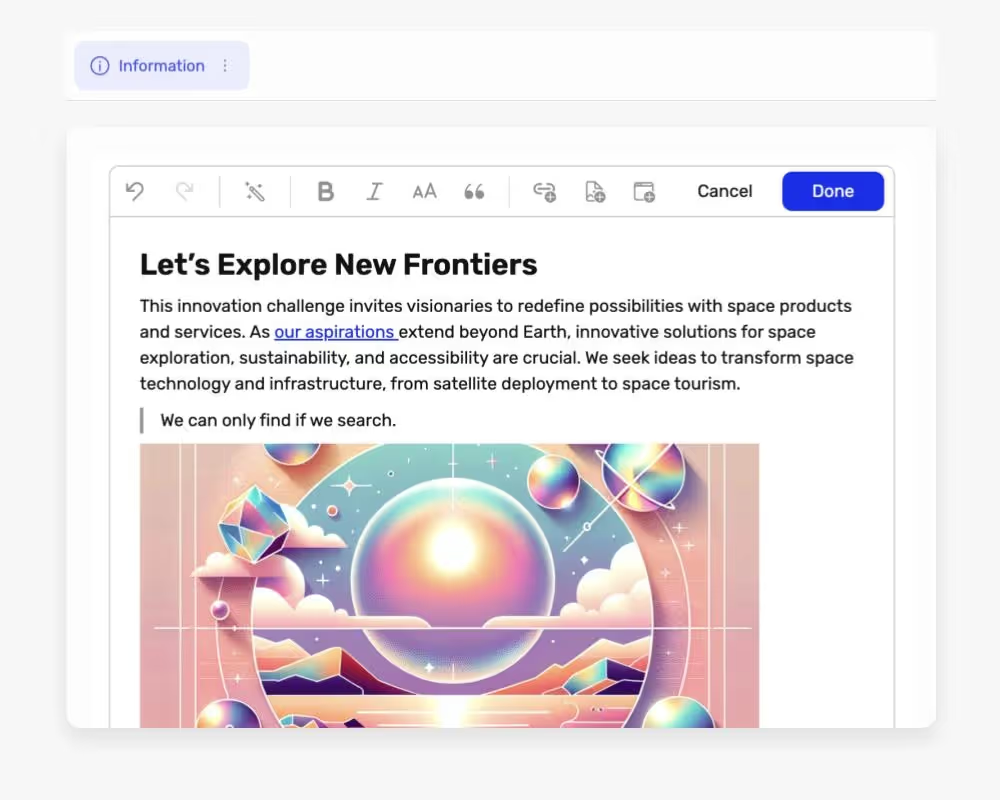
Add a View for your Idea Collections that only contains a style friendly WYSIWYG (what you see is what you get) rich text editor with AI. Great for a readme section.
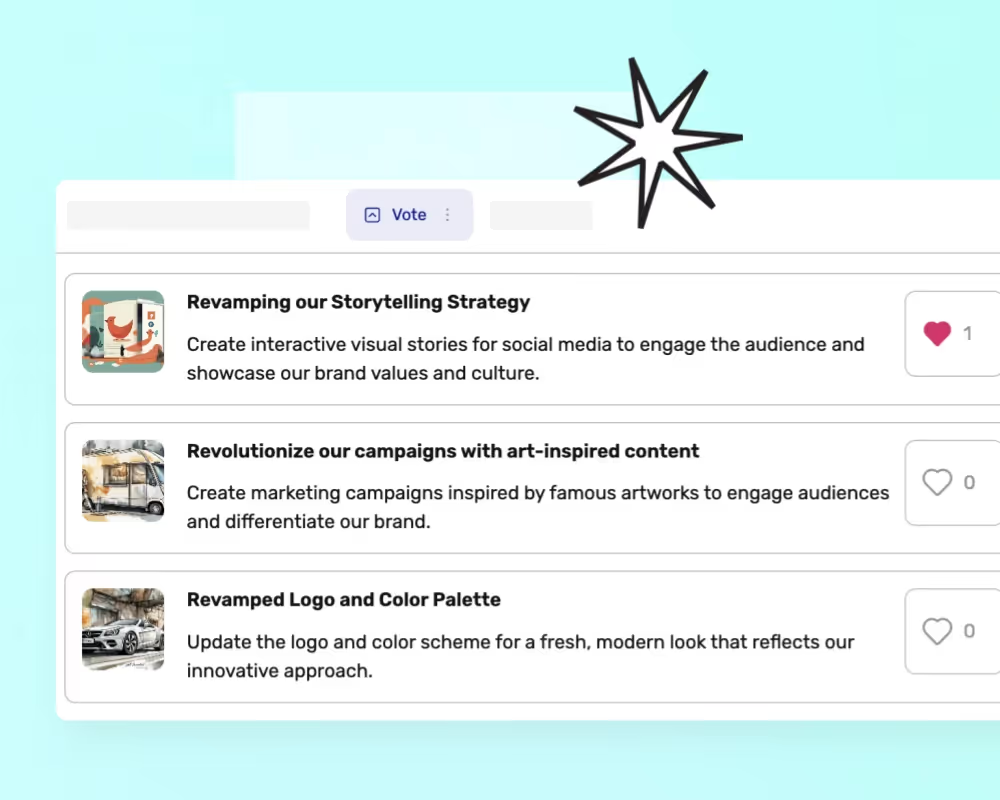
Collect ideas and see them in a board focused on upvoting to the right.
- API Speed improvements and increased stability.
- Added support for filtering inside Column views in missions.
- Made all relevant columns sortable in Audit Log modules.
- Ideas can now be ordered by their length.
- Added missing labels for some of the text fields inside SAML settings.
- Fixed a naming issue when duplicating a form with a standard name.
- Added better support for dynamic bindings and custom translations inside embedded idea widgets.
- Fixed an issue where the starting day of the week would be incorrect for some timezones in our calendar widgets, causing legibility issues when picking dates.
- Other bug fixes and improvements.
- Fixed an issue where existing attachments could be removed when 'Update Idea' automation actions ran
- Fixed an issue where 'Send Email' actions with only a subject and an empty body would not be sent.
- Fixed an issue where [object Object] could appear on ideas and Excel exports for 'Text list' fields when they were empty
- Fixed an issue where the browser's autofilled value could show on top of placeholder text in email address inputs when the page loaded
- Made som translation string updates
- Minor UI fixes and improvements
- Added new form field type: Text List.
- Added support for optional descriptions on rating criteria, shown as tooltips when users rate ideas.
- Added ability to archive form fields instead of deleting them, preserving submitted idea content while hiding the fields from new submissions.
- Added datalist dropdowns for editing static ‘Category’ fields when a user with full access edits ideas or form entries.
- Added support for dynamic variables in min/max dates for ‘Date’ form fields, including referencing other field values.
- Added ability to customize link color as part of theming.
- Updated permission logic so that locked ideas and activities can now always be edited by users with Full Access.
- Updated UI components to clearly display locked or hidden status of ideas and activities.
- Updated scroll behavior so the scroll position is remembered when navigating back to the home/missions page.
- Fixed an issue where Attachment fields in forms were not working correctly at all times.
- Fixed an issue where available fonts could sometimes be empty.
- Fixed an issue where favicons didn’t work as expected.
- Fixed a bug where the DIVIDE() dynamic expression function didn’t work.
- Fixed an issue where ‘Is Member Of’ and ‘Is Not Member Of’ team filters did not trigger correctly for indirect memberships via subteams.
- Added ‘# of times viewed’ datasets to user-focused charts, showing how often a user visited an idea collection
- Added ‘# of Unique Sessions’ datasets to charts focused on users, teams, and devices—enabling metrics like Daily or Weekly Active Users
- Added a new activity for the audit log when a form entry changes its contents
- Added a new automation trigger: ‘Changed form content’
- Updated some AI prompts within AI automation steps
- Updated incorrect German translations
- Updated wording from ‘# of views’ to ‘# of times viewed’ for improved clarity
- Changed idea collection cards to hide the idea count when it is 0
- Fixed an issue where long labels in XY-plot charts could appear twice
- Fixed an issue in ‘Send Email’ automation actions where some dynamic expressions appeared as ‘Not Calculated’
- Fixed an issue where idea content values could be cached for too long
- Fixed an issue where very large numbers in numeric text fields turned into exponential notation while typing
- Fixed an issue where sorting based on numeric or slider fields didn’t sort correctly
- Minor UI and UX improvements
- Added new Dynamic Variables "sessionUser.stats.comments" and "ideaCollection.stats.ideas.days7"
- Updated Idea Collections with Enforce Owner Access now display a Not Shared label if not yet shared
- Updated the Information View to allow all URLs to be embedded but warn if it will not work optimally
- Updated map charts so they will now show the amount of items for which the location could not be located
- Improved Geolocation lookup functionality
- Improved accessibility towards WCAG compliance
- Improved the user experience of using Shareable Links when only Without Signup is enabled
- Improved overall performance
- Fixed interoperability between Information views and Dynamic Expressions
- Fixed an issue where long idea collection questions could be illegible for editors
- Fixed an issue where teams could not be dragged into or out of other teams
- Fixed an issue where users would still receive emails triggered by Send Email or Custom Notification automation actions after opting out of emails sent via Automations
- Fixed an issue in Send Email automation actions where linebreaks would not appear correctly in the preview
- Fixed an issue where some lists would appear reversed in Firefox
- Fixed an issue where edited comments would not show the new text before reloading the page
- تمت إضافة مواعيد نهائية وأهداف لجمع الأفكار ظاهرة على بطاقات جمع الأفكار.
- تمت إضافة أعمدة جديدة لتصديرات إكسل: تخفيضات التقييمات وتخفيضات إدخالات النماذج.
- تمت إضافة إشعارات تقدم التصدير التي تستمر عبر تحديث الصفحة.
- تم التأكد من تصدير أعمدة عرض القائمة المختارة في تصديرات إكسل.
- تمت إضافة أسماء ملفات مرفقات محسّنة في تصديرات إكسل.
- تمت إضافة رابط لمقالة مساعدة لإعداد رمز SendGrid في مساحة العمل.
- تمت إضافة مربع تحذير عند الإغلاق مع وجود تغييرات غير محفوظة.
- تمت إضافة اقتراحات تظهر فورًا في مربع الحوار المشاركة.
- تمت إضافة شريط أدوات فلترة مدمج في عروض البريد الوارد.
- تم السماح للمسؤولين بتحديث صورة غلاف مساحة العمل من الصفحة الرئيسية.
- تمت إضافة تحسينات طفيفة في واجهة المستخدم.
- تمت إضافة رسالة منبثقة تظهر عند تغيير وصول جمع الأفكار.
- تم تغيير معاينة قالب جمع الأفكار لتكون أكبر.
- تم تغيير تجربة المستخدم لمرشح الهدف في إجراءات الأتمتة.
- تم تغيير واجهة المستخدم لإضافة/تعديل المعايير.
- تم تغيير الفرز والأبعاد في المخططات والرسومات لتسليط الضوء على الاختيارات النشطة.
- تم تغيير عداد الإشعارات في مربع الحوار المشاركة ليختفي عند الصفر.
- تم تحديث بعض سلاسل الترجمة.
- تم إصلاح الشروط في حقول النماذج في مراحل التوسيع.
- تم إصلاح الفلاتر المخصصة في جمع الأفكار التي لم تظهر كفعالة.
- تم إصلاح عدم إغلاق القائمة المنسدلة عند النقر خارجها في وصول جمع الأفكار.
- تم إصلاح فشل إنشاء الأفكار غير الضروري مع بيانات معاينة الرابط.
- تم إصلاح مشاكل مزود تسجيل الدخول بنقرة واحدة من مايكروسوفت.
- تم إصلاح تدفق أسماء المستخدمين الطويلة في شريط الأدوات.
- تم إصلاح تداخل تدرج التمرير في قوائم القوائم المنسدلة.
- تم إصلاح إنشاء حالات فارغة.
- تم إصلاح عدم إمكانية إزالة صفوف المستخدم عند الدعوة.
- تم إصلاح مشاكل التحرير في قوالب جمع الأفكار.
- تم إصلاح مشاكل تحرير تخطيط العرض في جمع الأفكار.
- تم إصلاح محاذاة عنصر نائب النص متعدد الأسطر.
- تم إصلاح عدم تزامن حذف جمع الأفكار في الوقت الحقيقي.
- تم إصلاح عدم إنهاء مهام إلغاء مهام تصدير الوظائف.
- تم إصلاح محاذاة تنسيق خانة الاختيار.
- تم إصلاح التمرير مباشرةً إلى النماذج المكررة.
- تم إصلاح ظهور أسماء ملفات الصور المرفوعة عند التمرير فوقها.
- Streamlined our billing as well as new pricing plans for increased customer flexibility and self-service
- New share dialog design that improves on the layout and adds new functionality, such as custom invitations
- New design for the help launcher
- Create activities are now preserved after deletion, and more metadata is associated with them, to improve the audit log
- Improved the wording of data retention settings
- Fixed an issue where a user could receive an empty rank
- Fixed an issue where some filters could crash analytics charts
- Fixed an issue where setting up certain filters could crash column views
- Implemented initial tooltips for onboarding to make it easier for new users to navigate the platform.
- Added Traditional Chinese language support.
- Microsoft Teams UI now automatically matches the theme for a consistent and enhanced user experience.
- Fixed an issue where the "Add Idea" button in the side navigation was still visible when the user didn't have permission.
- Various bug fixes and improvements
.avif)
In the upcoming days, as part of our effort to make innovation easy to understand, we will rename Missions to Idea Collections. This change aims to make its purpose more intuitive for new customers while maintaining the same functionality. Our help articles will also be updated with the new Idea Collections terminology. We believe that this upcoming update will make Ideanote more intuitive for everyone.
- Improvements to the presentation and structure of dynamic bindings inside automations for a more user friendly experience
- Exporting Audit Log data as Excel now show the same data
- Fixed an issue where translations would not appear inside widget
- Fixed an issue where you could not filter out users without any team memberships inside the simple filter in missions
- Fixed an issue where the Custom Filter inside missions could not render some filter keys correctly
- Fixed an issue where the move idea to mission would crash if a filter was set as a query parameter
- Fixed slow icon pagination
- Widget settings UI has been redesigned and additional customization options have been added
- Users list shows Team Owners
- User can now be filtered by "last active at"
- Updated billing settings page
- It is now possible to link to specific settings tabs
- Duplication of forms is now possible
- Ideas older than 30 days now show absolute date
- Absolute idea date of idea creation is now visible on hover on the relative date
- Fixed XLSX export limits
- Added more tooltips for ease of use
- Small bugfixes and UI improvements
January 6, 2026
Similar Ideas, Granular Notifications, Authentication Methods and Smarter Automations
- Added 'Similar Ideas' feature during idea submission to reduce duplicate ideas.
- Added support new login providers: LINE, Facebook, GitHub, and Apple
- Added complete overhaul of the Notifications system, with more granular controls and customizability.
- Added support for defining Data Retention policies per idea collection to override default security settings.
- Added ‘Moved to another Section’ as a trigger in Automations.
- Added ‘Change Section’ as an action in Automations.
- Added support for updating all ideas on a specific form using ‘Update Idea’ automation actions.
- Updated default value and type changes in Static fields to prompt users about updating existing submitted content.
- Updated AI to generate more diverse ideas.
- Changed delay before conditional fields are shown, reducing wait time.
- Fixed an issue where user-provided content within automation actions were removed when the trigger was changed.
- Fixed accessibility issues related to screen readers.
- Fixed an issue where multiple ideas could be submitted if rapidly clicking the ‘Submit’ button.
- Fixed an issue allowing ideas to be submitted without values for required (but not yet triggered) conditional fields.
- Fixed ownership handling of idea collection templates when deleting users with the ‘Reassign Content’ strategy.
- Fixed several issues related to SCIM synchronization.
- Fixed audit logs to include events when a mission moves to another section.
- Minor bug fixes and improvements.
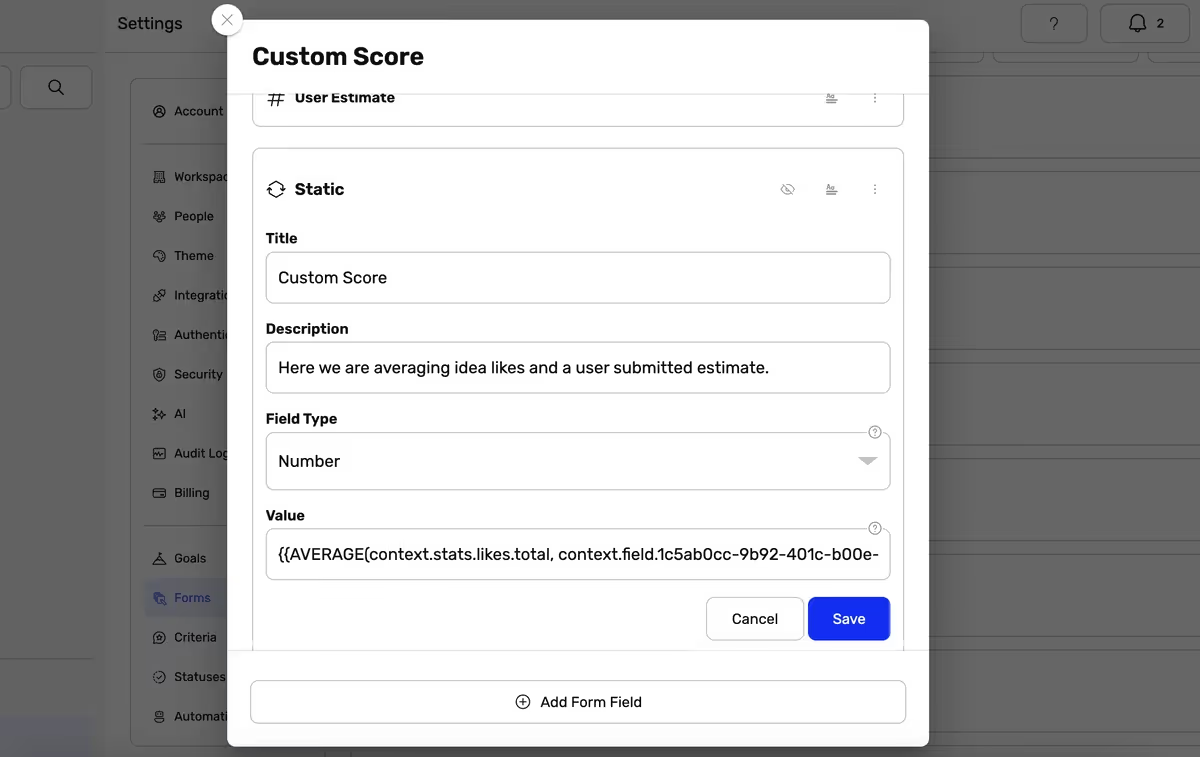
A new type of field that can be used to define values on ideas and form entries that aren't visible to users during submission, and cannot be edited by them afterwards. These can contain constant values, or use Dynamic Expressions to compute formulas, functions, and expressions.
- Added Static Fields: A new type of field that can be used to define values on ideas and form entries that are visible to users during submission, and cannot be edited by them afterwards. These can contain constant values, use real-time Dynamic Expressions and be updated via automation workflows.
- Added Dynamic Expressions: Our old Dynamic Binding system has been supercharged and can now do a lot more, including performing math operations, calling functions, and add logical value comparisons.
- Added additional kinds of security-related activities for the audit log: 'Changed password', 'Enabled IP Anonymization', 'Disabled IP Anonymization', 'Exported User Data', and 'Exported Workspace Data'.
- Added more visual feedback when links are copied to the clipboard.
- Added support for conditions on fields in Expand phases referencing fields from other Expand phases.
- Improved the co-owners and anonymity features so that they can now be used together.
- Improved performance when reordering views.
- Improved filtering so you can now set up filters for matching on ideas for which they have an attachment or not.
- Improved restrictions inside embed views and added a disclaimer stating that not all websites are supported.
- Improved the media picker by ensuring that aspect ratio is shown when selecting/generating images.
- Improved performance and rendering with optimisations.
- Improved our default themes to now better support dark- and high contrast modes.
- Updated the icon for hidden activities to better differentiate it.
- Updated the email builder so it supports the <ul>, <ol>, and <li> elements.
- Fixed an issue where non-admins could export user data for someone else.
- Fixed an issue where & could appear inside the subject of emails sent from Ideanote when the workspace name included a & character.
- Fixed an issue where searching in the audit log didn't work.
- Fixed the color tab in the Appearance settings so it defaults to the one matching the users' current preference.
- Fixed an issue where changing the hour/minute selection in date pickers did not save the selection.
- Fixed an issue with datetime preferences showing Greek characters for other languages when formatting dates.
- Fixed an issue with blank PDF previews inside the Teams integration.
- Fixed an issue where bulk actions did not work inside List views.
- Fixed an issue with navigating to profile pages sometimes.
- Fixed an issue where AI images could disappear from Information views.
- The bulk actions in the idea list is now available again
- When saving images to the rich text editor, they show up also after reloading
- Fixes some issues related to showing time
- Fixes the button in the app bar that takes the user to the profile page
- Instead of rendering a blank PDF in teams we now render a PDF logo and the name of the file (its not currently possible to render the PDF inline because of MS teams security).
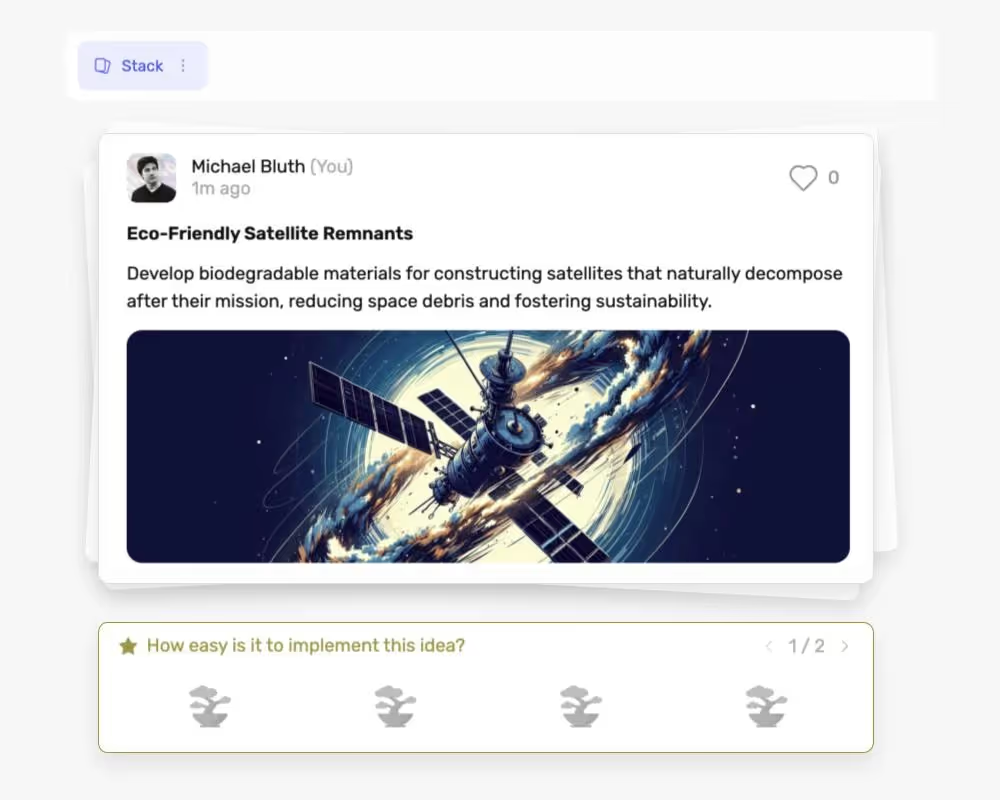
Easily focus on one idea at a time with the Swipe view for ideas.
- Made the usage of icons for phases more consistent
- Fixed an issue where an icon would not appear for a phase inside the Share dialog.
- Adjusted the size of the sidebar onboarding tips.
- Added spam detection to emails sent via Ideanote to protect our domain reputation.
- It is now possible to customize the sections on the homepage without adding or removing teams.
- Revamped onboarding flow in the Microsoft Teams integration
- Completely new onboarding flow for creating new workspaces
- You can now customize which phase ideas will move to when they are accepted from the Review phase
- You can now configure embedded widgets to use the browser's preferred language.
- We have removed Serbian, Russian, Romanian, Korean, Japanese, Norwegian, Croatian, Polish as selectable languages from the platform.
- Multi-line text fields are now taller
- Needs action filters now correctly handle cases where an idea is only partially evaluated in a Rate phase
- You can now see average ratings by individual rating criteria in List views
- Fixed an issue where the list of activity types was empty inside custom filters for activities
- Fixed an issue where using query params from automation triggers didn't work inside automations
- Fixed an issue where the incorrect dynamic binding suggestions were shown inside automations sometimes
- Notifications are no longer sent for new likes or status changes on ideas when the idea owner no longer has access to the mission they are placed within
.avif)
Previously Teams where both for managing users and the location of missions. Here are the changes: 1) Teams are now only used for managing many users at once. You can give entire Teams access to a mission. 2) Sections let you organize missions on the home page, which has no influence on access. You can have as many or as few Sections as you want.
- Added a "simple" idea excel export that only includes essential columns.
Added more information to audit log to make it easier to read.It's now possible to see failed/succeeded email activities in audit log. Use this feature to understand if emails are blocked by your intranet and why. - Smaller bug fixes and improvements to settings and tooltips
.avif)
Quick Drafts let you write down any raw ideas without structure in private. You can turn them into ideas later. You can enable Quick Drafts for your workspace in the security settings.
- Added Quick Drafts: create lightweight drafts and turn them into ideas later. Quick Drafts can be enabled in Workspace security settings; they use AI (when available) to suggest the best matching idea collection and align with its template, with a graceful fallback when AI isn’t available.
- Added a redesigned global “Add Idea” experience, including creating Quick Drafts directly from the chooser.
- Added "Drafts" page to sidebar that makes it possible to easily administer Idea Drafts across Idea Collections.
- Updated sign-in and authentication flows for greater reliability in in-app browsers such as Line or Facebook Messenger.
- Updated widget configuration: added primary color availability and styling improvements; selected widget button colors now persist across color modes and outlines show only when needed.
- Updated rating UX: slowed the rating animation for smoother feedback and adjusted the default prompt when rating comments are allowed.
- Updated loading skeletons so they only appear when the list of idea fields is empty when adding an idea.
- Fixed pagination where lists could “jump” to the next set instead of appending; also fixed a dark mode text-stroke issue on funnel charts.
- Fixed phase settings sometimes applying changes to another phase of the same kind; edits now reliably affect only the selected phase.
- Fixed collapsed sections not staying collapsed when navigating between pages.
- Added Rate Phases Comments, an option that allows people rating ideas to leave comments.
- Added a reset button in the Security Settings to make returning to defaults easier
- Updated the layout settings of the inbox view to only show relevant elements.
- Update to comment posting dates to see exact timestamps..
- Fixed the browser back button for navigating between Idea Collections
- Minor UI fixes and improvements
- Added a helpful dialog when attempting to delete content that is still referenced elsewhere.
- Updated the default email interval for notifications of the type “Ideas in followed idea collections.”
- Changed search behavior on the main page to only show sections with content when searching for idea collections.
- Changed behavior for SCIM-managed teams: team memberships of SCIM sync teams can no longer be edited inside Ideanote and must be managed via Active Directory.
- Fixed an issue where “New Idea” and “Update Idea” automation actions wouldn’t run if they referenced deleted form fields.
- Fixed an issue where special HTML characters like > could appear in some emails.
- Fixed an issue where values submitted in “SCORE” fields were not numerically sorted.
- Fixed an issue with checkmark fields using “Show as dropdown” where only one option could be selected.
- New Regional Preferences security settings option where you can choose the region through which we send emails with Sendgrid. You can choose between the United States, the European Union, or auto.
- You can now manually trigger the installation of the Ideanote PWA from Account settings when applicable.
- Added placeholder texts to several search fields
- The progress bar inside idea widgets will now be full in the last step of the form.
- Fixed an issue where using the arrow keys with dropdown fields didn't work.
- Fixed an issue where long idea collection questions could cause layout issues on cards.
- Fixed an issue where errors produced during bulk actions would not appear and would fail silently.
- Fixed an issue when sharing an idea collection where the notify counter could say 0.
- Resolved a potential XSS vulnerability
- Minor bug fixes and improvements.
- Real-time filtering: Now, ideas will enter and leave views dynamically depending on whether or not they match the filters, without having to refresh the page.
- Teams as Section Owners: You can now make a team the owner of a section. This will make every member of the team able to manage the section, as well as the idea collections within it.
- Improvements to the Zoom Level accessibility option.
- Fixed an issue with autocomplete inside the add people dialog.
- Fixed an issue when setting up custom domains or editing the subdomain where it wouldn't work when it ended on a dash.
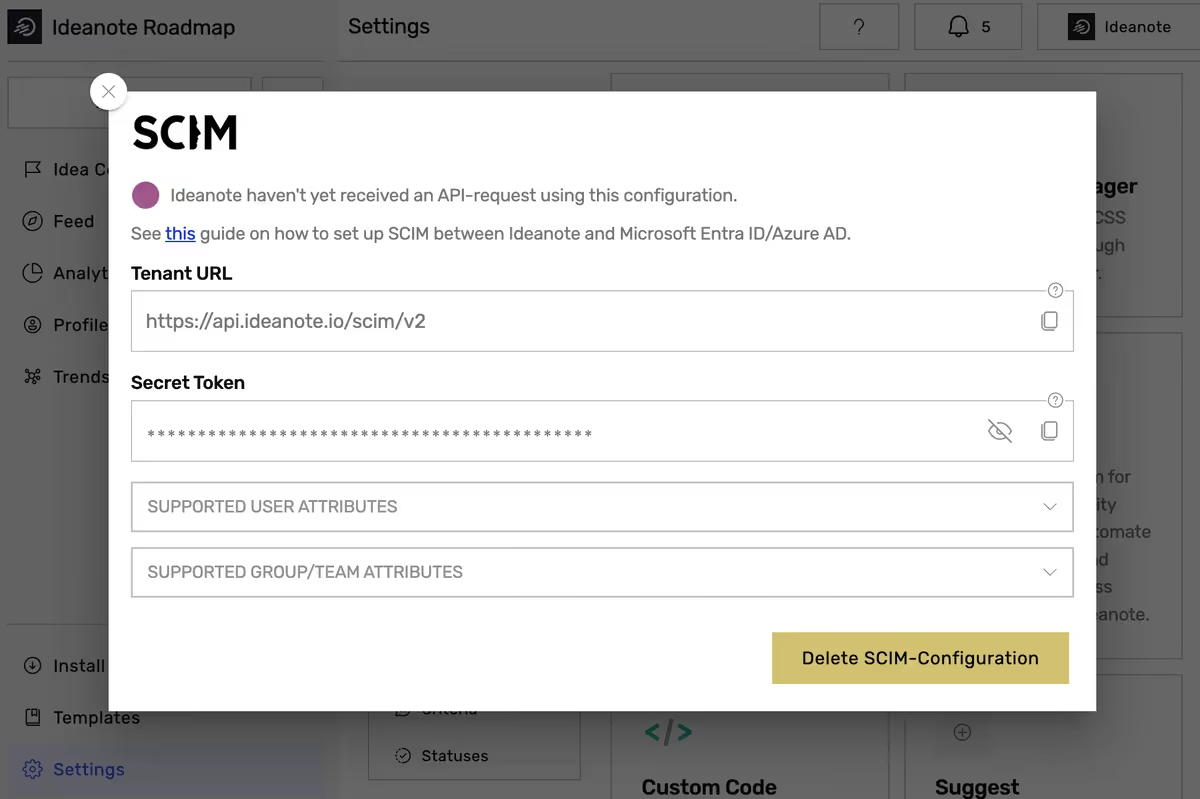
SCIM provisioning allows managing user identities in the cloud centrally for the entire organization and is a preferred standard for some larger organizations.
- Ideanote now fully supports languages with right-to-left layout.
- We have resolved an issue where users were unable to remove themselves from an idea collection.
- Duplicated forms fields are now correctly dynamically translated
- Other various bug fixes and improvements
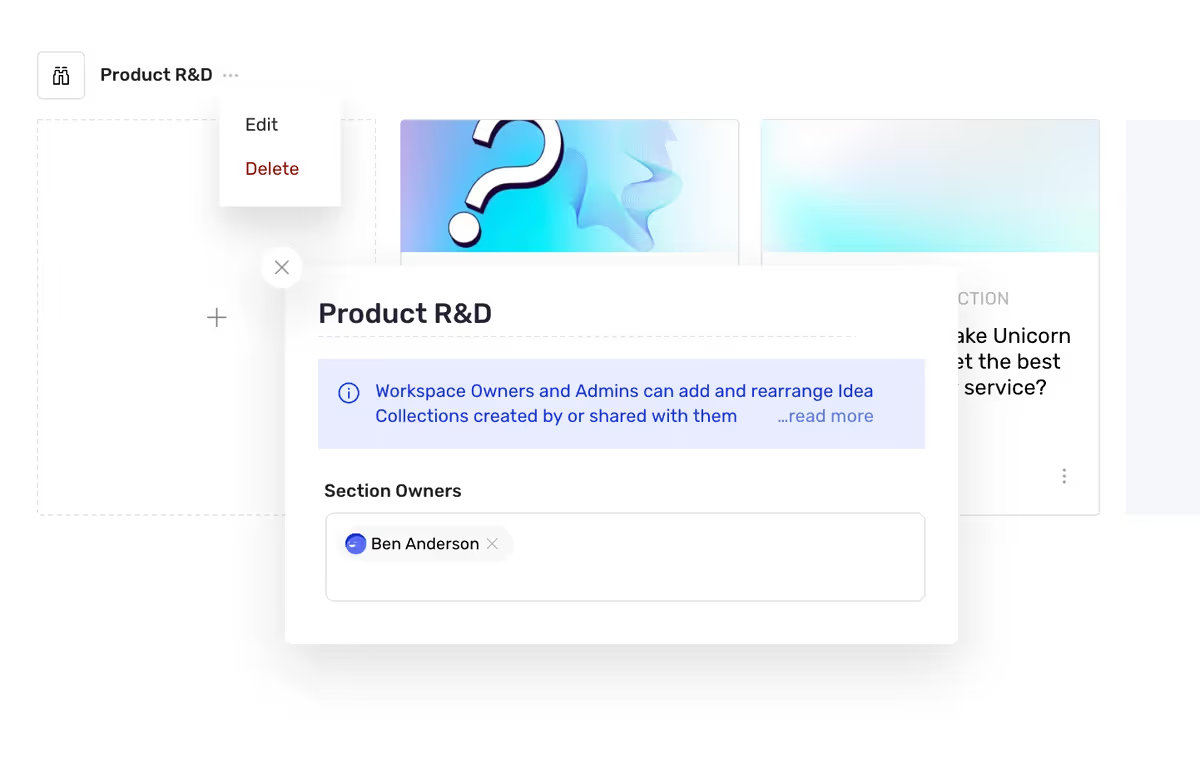
Workspace Owners and Admins can now delegate section-specific responsibilities, enabling selected members to manage idea collections within their designated areas of responsibility. We've refined section visibility rules and streamlined security settings, ensuring clear rights and privileges across all user levels.
- Added ability to set limits on the number of comments and idea expansions per phase.
- Added "# of Users who Rated" as a filter key for automations.
- Added smart "Filter by title..." option for charts to match fields across different forms.
- Updated the rating summary so users with access to rating activities now see it expanded on the idea details.
- Updated the workspace creation with AI for better demo content creation.
- Added ‘Limit to 1 per idea’ feature for Expand phases
- Added ‘Restrict to Idea Owners’ feature for Expand phases
- Updated Form Entries to support co-owners
- Fixed an issue where selecting 'Manage ideas' in the Share dialog would appear as 'Create ideas'
- Fixed an issue when creating an idea collection where selecting a template with co-ownership enabled would not work
- Fixed an authorization issue in automations that could cause fewer phases to be selectable for 'Change phase' actions
- Stability and performance improvements
- Fixed an issue where custom phase icons would not show correctly when sharing an idea collection
- The phase actions are now visible when having a very dark theme color while having the UI in darkmode
- Fixed an issue where in some cases the co-owner avatars would not show up
- We have increased the amount of fair AI usage
- Various bug fixes
- Ideanote now supports Polish language
- The Notification panel has gotten a complete overhaul
- New Vote view for idea collections: a view focused on liking ideas.
- Optimised onboarding experience with helpful guides in the sidebar
- You can now opt in to displaying Idea IDs directly on the cards of ideas inside a view in its layout settings
- You can now initiate live chat with Ideanote support via the help launcher
- Moved the ‘Allow remote customer support’ toggle from security settings into the help launcher
- Long form entries will now be collapsed inside activity feeds
- Fixed an issue where the load more button on the home page said teams instead of sections.
- Fixed an issue where our NPS survey could display on top of dialogs.
- Aligned the styling of min-/max indicators in create/update idea automation actions
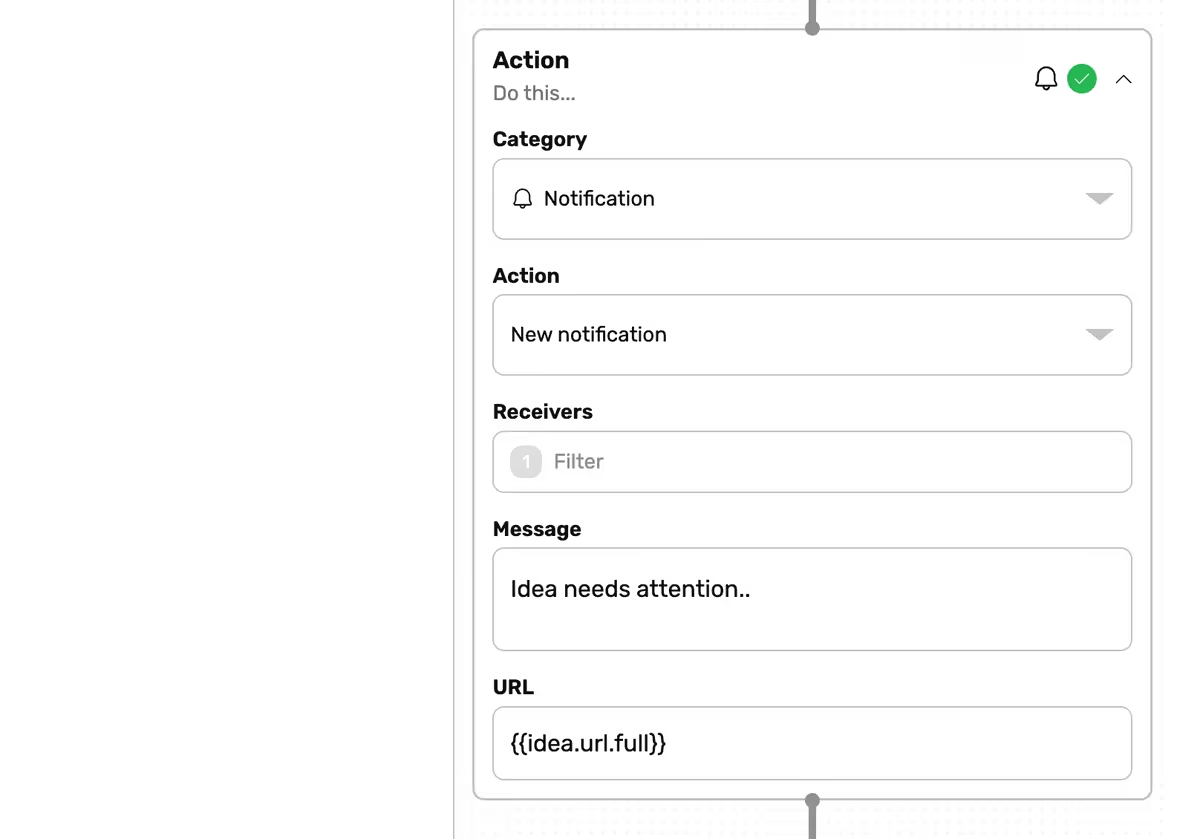
Use our inbuilt automation system to create and send notifications to people. Notifications are listed in the app and sent via email as part of the existing notification system.
- Improved the layout of attachments
- Made parts of the onboarding flow dismissible
- Fixed the aspect ratio of the mission cover image inside the edit idea collection dialog
- Fixed an issue where using the keyboard arrows to move the cursor position inside comment action cards in idea details would change to a different idea in the idea collection.
- Fixed an issue where widgets embedded via custom code would auto-close after a few seconds in some cases
- Fixed an issue where the Unsplash library was not loading.
- Fixed an issue where tooltip onboarding flows were sometimes placed on top of other dialogs.
- Fixed an issue where custom filters could become malformed or ignore user-provided values.
- Fixed an issue where changing the sorting direction was not working.
- Minor UI improvements and fixes
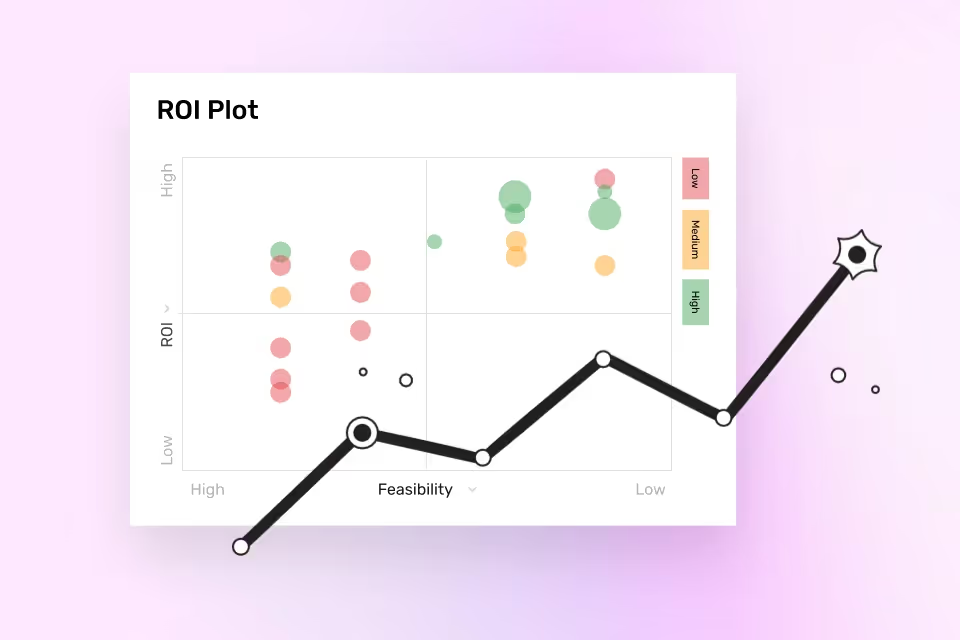
Easily see top performing ideas with a customizable XY scatter chart. Customize any axis, size and color to analyze many ideas at once.
- Added a new My Ideas filter inside idea collections
- Added a new Smart Title layout option for views that present ideas.
- Added a scroll gradient to many scrollable lists to indicate to the user that more content is available after scrolling to it.
- Added some missing translations
- Added a new in-app prompt for installing the Ideanote PWA.
- Added a loading animation when a new phase is created via idea collection settings
- Average Rating Filters can now also be used outside of idea collections, such as in workspace automations or the global ideas page.
- Improved the placeholder text when creating or editing idea fields.
- Improved the behavior of collapsable tab menus that could briefly render incorrectly before collapsing into a collapsed presentation. For example, the list of views inside an idea collection
- Made it easier and more accessible to see the currently selected idea in Inbox views. It now also supports keyboard navigation with the arrow keys.
- Made it easier to see what feature(s) a workspace might be exceeding
- Very long selected sorting options will now be truncated.
- Idea values for dropdown fields will now appear on idea cards as chips
- Improved how multiple choice values such as checkmark fields would be rendered when used inside dynamic bindings
- Fixed an issue where inviting users or teams to an idea collection would sometimes not work
- Fixed an issue where keyboard navigation with the arrow keys didn’t work when looking on the attachments for an idea
- Fixed an issue where untoggling all activities inside audit logs could still show some activities.
- Fixed an issue where the words [object Object] could appear inside the UI
- Fixed an issue where empty notifications would sometimes appear
- Fixed an issue where the Notify counter when sharing an idea collection would sometimes show the wrong count, depending on the workspace preferences. It now also shows a loading spinner while it is being calculated
- Fixed an issue where charts focused on # of Sessions or Session Duration would produce incorrect data
- Fixed an issue where ideas being created from a template could have their contents duplicated after cloning.
- Fixed an issue where dropdown would sometimes jump around when trigged when the ‘reduced motion’ accessibility setting was active
- Fixed an issue where the view access dropdown menu would close when the user clicked anywhere in it.
- Fixed some occurrences of overlapping buttons depending on the available screen width
- Fixed an issue where hovering over the icon for saving an edited view didn’t work when the list of views for an idea collection was in its collapsed presentation
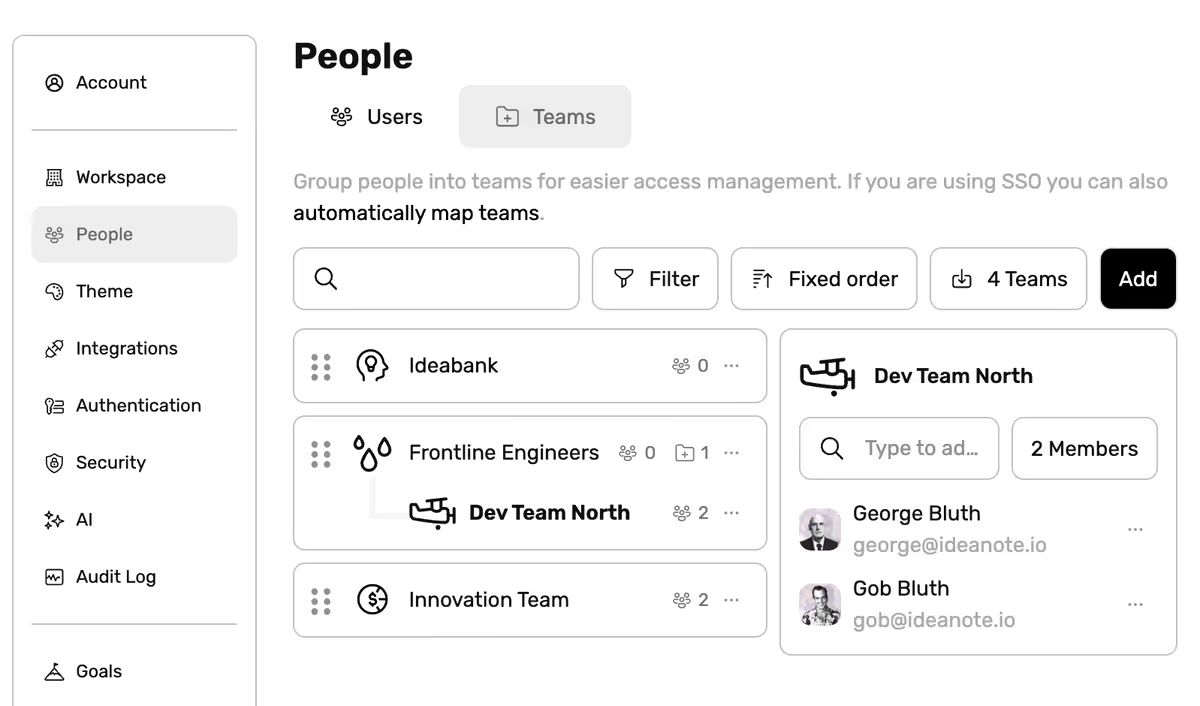
The Nested Teams functionality enhances the organizational structure within Ideanote by allowing the creation of sub-teams within existing teams. This feature facilitates finer-grained access control and a clearer hierarchical team management system, reflecting complex corporate structures within the Ideanote platform.
- Introduced a new version of our in-app Help Launcher
- Viewing idea collections from an idea widget now correctly spawns a "viewed idea collection" activity
- Viewing ideas in column view now loads 10 ideas instead of 5 ideas as default
- Exporting excel from audit log and people list now respects selected columns
- Generated AI images now have correct size and aspect ratio depending on the context
- The Ideanote logo on the login-page now correctly respects dark mode
- Improved spacing in the "choose member" idea field
- Fixed problem where the people list wouldn't show the teams column
- Visual improvements and various bug fixes
- Added new option to generate AI based illustrations right inside Ideanote
- Added new automation trigger that triggers when the content of an idea has been updated.
- Added support for Slovene and Norwegian language
- Added a deeplink option for Microsoft Team App that allows users to correctly copy mission links
- Improved AI Idea Generation
- New updated help articles at https://help.ideanote.io
- Various bug fixes and improvements
- We've added a new view for your idea collections: Embed View. With the embed view it's now possible to embed a specific URL directly into the view of your idea collection.
- It's now possible to assign an entire team in the act phase
- Added option to select multiple members when setting up a "Select member" form field
- It's now possible to export ideas created by a specific user from user profile page
- Fixed problems where activity actions weren't shown when "summaries" were hidden for a given phase
- It's now possible to choose between more statuses when the last reviewer selects a status in the review phase
- AI now generates longer content
- Fixed problem where searching in some dropdown fields wouldn't correctly filter the entries
- You can now submit multi-line text-fields with CTRL + Enter in the idea widget
- Fixed flag icons in Custom Translations Variables.
- Various bug fixes and UI improvements
- New design for the sidebar
- New Idea Field: "User" which allows for selecting a user as part of the idea submission form.
- SCORE idea fields can now be displayed with a color gradient
- Added email- and alias filtering to custom filters for users.
- Added "updated idea mission" trigger to automations
- Added "delete idea" action to automations.
- Updated design for the mission picker dialog
- Updated idea link activities to be more compact
- Fixed an issue with filtering where it would sometimes collapse ANDs into ORs.
- Fixed an issue where the "Activities" tab in profile settings said "Assignments".
- Mission template preview images are now refreshed when the mission changes
- Labels in plot view no longer collapse their padding when it is scrollable
- All insights are now accessible for all plans
- Added compatibility for the new 'Send' feature for ideas and idea collection inside the native Microsoft Teams integration
- Added a security option allowing workspaces to opt out of sharing usage data
- Added the possibility of restricting access to a view to users with 'Manage' access. This will either be users invited with explicit Manage access, or users with full access that currently opts out of that access mode
- Removed the warning that appears when closing the 'Add idea' and 'Add form entry' dialogs. Drafts are always saved, so content will never be lost.
- Increased the prompt length restriction for AI steps inside automations for paid subscriptions
- Fixed an issue where updating a Chart could sometimes fail
- Fixed an issue with duplicating Rate and Expand phases
- Fixed an issue where setting up 'Idea Collection Access' user filters and selecting 'Full Access' always selected all users, even those without full access.
- Fixed an issue where linking to another view inside an idea collection that was already open sometimes didn't work correctly.
- Added a Merge Ideas tool in Cluster and Trends views so teams can combine related ideas into a new suggestion or merge them into an existing one while keeping the original owners.
- Changed idea cards to hide expansion summaries whenever every field in that summary is turned off in the layout, keeping cards focused on visible content.
- Fixed Send Email automations so they show blanks instead of unresolved placeholders when a variable is left empty.
- Fixed idea imports so CSV files from an idea collection can reference attachments via URLs with filenames.
- Fixed the global add-idea flow so the idea collection count stays accurate when using the AI Best Match for Draft ordering.
- Fixed the idea collection picker sorting to follow section order first and idea collection order second, matching the hierarchy on the home view.
- Fixed an issue where chip lists would always select the first item in the list if a search query was present
- Full Access Mode Toggle: Users with Full Access to Idea Collections can now decide if they want to make use of full editing rights or not.
- You can now select 'Manage ideas' as a new access setting inside the Share dialog in idea collections. This grants users access to edit ideas, change their phases and update their statuses, but not access to edit the the underlying Idea Collection and its details and settings.
- New ‘Accessibility’ settings tab under Account settings.
- The Browser/OS preferences for Motion Intensity are now respected, and can be customized via Accessibility settings.
- Added a new security toggle, ‘Allow remote customer support’, that explicitly grants Ideanote support access to a workspace for support cases.
- Creating a new idea collection template is now substantially faster and more reliable.
- Activities made by a user can now be exported to Excel from their profile page.
- Fixed an issue where numeric chart labels would not appear on horizontal charts.
- Allowed text labels on charts to grow larger for improved visibility on large numbers.
- The full non-truncated text labels are now always shown on charts inside tooltips shown on hover.
- Added a new ‘Show Legend’ toggle to many charts that, when enabled, will always show the legend on the charts, even when presented as cards. The legend will continue to be shown when a chart is expanded or in presentation mode.
- Added headlines to the Template Gallery pages.
- New Scorecard charts will default to having no background fill color.
- Funnel charts that group on phase names inside idea collections now respect their relative ordering.
- Fixed an issue where an incorrect warning about unused dynamic bindings could appear inside automations
- Fixed an issue where phases with Hidden Activities could still notify users about activities in those phases, despite their missing access to them.
- Fixed an issue where moving an idea to another idea collection would appear in the UI as if it was added to all of its phases temporarily.
- Fixed an issue where drafts would not work on form entries
- Fixed an issue where the shareable links tab could appear inside the Share dialog even though shareable links were disabled on the Workspace.
- Fixed an issue where toggling ‘required’ or ‘show title’ on an idea field would discard the users input.
- Fixed an issue where the dropdown menu of suggestions for @-mentions would sometimes not appear in comment replies.
- Fixed an issue where some users could see the ‘Export to Excel’ button without having the rights to do so.
- Fixed an issue where admins was not allowed to export activities to Excel in some cases.
- Improved the generated filename of activity excel exports for ideas.
- New ‘Show as Dropdown’ option for Checkmark idea fields
- Added various new activities to the audit log for criteria, statuses, forms, and login providers
- URLs in Embed views can now be configured to open in a new tab, instead of being inlined on the page.
- RTL-support in emails sent via our platform, including custom emails.
- Optimizations for how Initial Fonts are being loaded
- Made it possible for automations to use data from the trigger idea inside create idea actions, including for binding it to the owner of the new idea
- Fixed an issue where a ‘Save View’ button could sometimes be shown to users without editable access to it
- Fixed an issue where adjusting filters inside a view would not update the UI
- Fixed an issue where the ‘Add’ button inside lists of form entries would be shown to users without the ability to add form entries
- Fixed an issue where changing the prefix/suffix for a scorecard chart would not update the UI
- Fixed an issue where activities would not be generated for all default content in a new workspace
- Fixed an issue where placeholders for ‘Attachments’ idea fields could overlap with the dynamic binding button inside create idea automation actions.
- Adjusted the width of view notices so it matches the width of the idea collection header
- Fixed an issue where ordering by the ‘Idea’ column inside Audit log would cause an error.
- Fixed an issue where the ‘Idea Collection’ column would be empty inside the audit log for Like activities
- Fixed an issue where our NPS survey could appear on the login page
- Better support for dark- and high contrast color modes inside the Trends page
- Fixed an issue where changing view accesses would not refresh the UI
- Fixed an issue where required member idea fields that allowed for selecting multiple users could cause validation issues when attempting to submit ideas
- Fixed various issues related to view layout settings
- Fixed an issue with setting up custom domains including hyphens
- AI mission creation process is now localized to support multiple languages.
- Filter by phase and status is now available while creating conditional fields.
- When using an idea collection template, the correct view will now be displayed after the creation of an idea collection.
- A new filter option to sort by the number of form entries has been added.
- Form entry field data can now be utilized in automation filters.
- Updated the default workspace statuses for new workspaces.
- The process of selecting values from dropdowns in idea generation has been made less biased.
- It is now possible to set up a filter based on whether or not a user has access to an idea collection, and to which degree.
- Empty translation variables are now handled more gracefully.
- Resolved an issue where the ampersand character would be incorrectly displayed in emails.
- Fixed the issue of missing tooltips in phase settings.
- Addressed an issue where the workspace cover would sometimes be overly compressed.
- Resolved an issue where cloning an idea collection template from another workspace would sometimes fail.
- Fixed an issue where, for some users, linked ideas and comment replies would not load properly.
- Rectified an issue where setting up tabs for Microsoft Teams would sometimes not display the text correctly.
- Fixed an issue where the analytics page would not load in Microsoft Teams.
- Conducted additional bug fixes and performance improvements to enhance overall user experience.
- Added support for creating and managing multiple drafts for ideas and idea expansions. These drafts are now saved to your account and accessible across devices.
- Added ability to create new teams during user import.
- Updated the Power Automate connector to include idea collection creation dates, section names, and support for fetching all items at once.
- Updated charts that group by phase to display phases in the correct order.
- Updated the Stack View so criteria are shown expanded vertically when rating.
- Updated the Idea Collection page to collapse empty sections older than 30 days by default.
- Fixed an issue where anonymity settings were not always applied when creating an idea collection from a template.
- Fixed an issue where real-time filters for ratings would not update correctly.
- Fixed disappearing list chart filters during user searches.
- Fixed [object Object] error in deletion prevention warnings.
- Fixed translation string inconsistencies.
- Updated Similar Ideas to be able to handle more ideas and re-enabled it.
- Fixed an issue where if there were multiple visible ‘average rating’ filters, changing one would change all of them
- Fixed an issue where referencing some keys starting with ‘mission’ via Power Automate and our public API.
- Text can be now left-, center-, right-aligned, or justified in Information views.
- The size of images can now be increased or decreased via the toolbar inside Information views.
- Member idea fields can now opt-in to also allow selecting teams, or the workspace, or both.
- # of Reviews, # of Comments, and many other similar kinds of filters for users now support selecting the idea collection in which the activities must have been made.
- Fixed a performance issue when typing inside dynamic expressions when there many available suggestions visible.
- Fixed an issue where the usage of raw HTML-tags would not render a preview value for idea collection editors after unfocusing the text field.
- When a Splunk integration has been set up, audit logs can now show when/if an activity was synced to a Splunk instance via a new Splunk-synced at column. Note: this only works for activities generated after this release.
- A list of the latest activities synced to a Splunk instance can now be seen inside Splunk integration settings, without having to open the audit log.
- Fixed an issue where several different kinds of activities shared the same action value in Splunk CIM-formatted activities, causing errors.
- Added additional metadata for Export User Data and Export Workspace Data activities inside audit logs.
- Export User Data and Export Workspace Data activities are now generated across every Export Button, whereas it was only for certain activities before.
- Improved server response times and stability
- AI features are now supported in the Microsoft Teams integration
- The most recently submitted form entry is now always given the lowest order
- Improved the layout of attachments within Information Views
- The required asterisk will now only be shown on fields in submission forms if Show required is explicitly toggled on in the field settings
- Added a maximum width to the help launcher
- Fixed an issue where Create Idea automation actions could add dynamic expression parts when referencing fields on ideas with no defined values
- Fixed an issue where the phase dropdown in certain automation actions (e.g., Change phase) would not display locked phases
- Fixed an issue that sometimes triggered multiple redundant View idea activities to be sent to the server
- Added a Security settings option to prevent users without edit rights from moving their own ideas to other idea collections
- The Submitted At column in List views now always shows absolute time
- Fixed a regression introduced in the most recent release that caused idea collection cards to appear behind others while dragging and dropping
- Fixed a regression introduced in the most recent release that caused the filter dropdown in idea details to appear in the wrong location
- Fixed an issue where certain activities, such as Create Custom Font, still appeared in audit logs even after all activity types were deselected
- Added Information Views: Ideanote now supports views where you can type anything via our brand-new rich text editor that is enriched by AI and supports both dynamic bindings and attachments.
- Added Stack Views: Ideanote now supports views where ideas are placed in a stack of cards that can be swiped to the sides to focus on a single idea at a time, with its action cards expanded.
- Added regional hosting support. Regional Preferences inside Security Settings has been changed to show the current workspace region, and a way for users to request migrating to another region.
- Added support for custom fonts: You can now upload your own fonts if the existing catalog of fonts is not sufficient. In case you wondered how Impact might look on your workspace, now is your chance.
- Added new Workspace settings menu: Default user settings. Here you can control the default settings for new users signing up to the workspace, such as their language, date formatting, notification, and color mode preferences. Users can still adjust these changes individually after their user is created.
- Added Greek language support.
- Added support for Custom Translation Variables to fill out all remaining languages with AI-based auto translation if AI is enabled on your Workspace.
- Added support in Theme settings for changing the color scheme depending on whether Ideanote is shown in Light, Dark, or High Contrast mode. This is especially helpful if your chosen colors are too dark in dark mode but look great in light mode, and vice versa.
- Added a new integration for Splunk: You can now send ideanote activities/events to your Splunk instance in near real-time. The same functionality is also exposed via automations.
- Added ability to duplicate Views via a new Duplicate option in their settings menu.
- Added a tooltip when assigning co-owners to ideas.
- Added new Show gridlines option to list charts, which when enabled shows lines under each item to better visually connect the data to the items. The Auto option (default) only shows the line when the chart is wide.
- Added support for using custom images as phase icons.
- Added Show Translation functionality support in comments. This will take effect for new comments submitted after this release.
- Added support for dynamic bindings and custom translations in Criteria and additional places inside idea fields.
- Improved styling of the Vote view page on mobile devices.
- Improved the Manage View Access dropdown UX and reliability.
- Improved Assignment action cards to allow selecting multiple users before auto-closing and has a submit button.
- Improved backend performance of several database queries.
- Improved the quality of AI translations, which now supports regional hosting.
- Improved the quality of AI suggestions for ideas, which is now more reliable, especially for complex forms, and uses a newer model.
- Improved the quality of AI suggestions for idea collections, and uses a newer model.
- Improved the quality of AI Image generation, which now supports regional hosting. Expect a small reduction in speed as a tradeoff.
- Improved the wording in Notification preferences with better descriptions of what each checkbox represents.
- Improved the visual distinction of archived idea cards.
- Improved stats cards to display the owner and creation date of idea collections.
- Improved select from list filters to show the IDs of ideas as labels to better help distinguish them, especially when they are untitled.
- Improved the styling of list charts in their table/horizontal layout, which now shows more even spacing between labels and correct right alignment.
- Improved validation for uploads of theme.json files.
- Improved Share dialog to show more stats, including the number of times a shareable link has been used by a user to gain access to it.
- Updated default charts for new Analytics views in Idea Collections by removing Ideas by Team.
- Updated security settings by removing a redundant toggle.
- Fixed an issue where touch devices such as mobile phones could not scroll through some lists, such as workspace settings.
- Fixed several dropdown and scrolling issues on iOS/Mobile Safari.
- Fixed an issue where updating parts of the workspace theme would sometimes not work or end up resetting quickly after the change.
- Fixed an issue where Map Charts could sometimes not render.
- Fixed an issue where Map Charts would display data for Australia twice.
- Fixed an issue where setting up conditions on phases on local forms could display phases across all idea collections in the workspace.
- Fixed an issue where a warning could appear about losing your draft when submitting an idea or a form entry, even though their contents were empty.
- Fixed an issue where filters, conditions, charts, and automation triggers could continue to reference form fields that had since been deleted.
- Fixed an issue where deleting a comment or removing a like would not disappear from the list of idea activities before the user refreshed the page.
- Fixed an issue where drafts for form entries would never load.
- Fixed an issue where select from list filters/conditions would not work when the operator was is not equal to.
- Fixed an issue where toggling required or show title on idea fields could remove their conditions or other parts of their configuration.
- Fixed an issue where relative time/timeago on idea cards could sometimes be off by one day.
- Fixed an issue where charts based on devices could be very slow.
- Fixed an issue where some notifications would display confusing code bindings.
- Fixed an issue where a WebSocket could sometimes have trouble reconnecting correctly.
- Fixed an issue where empty activities could appear in the Feed.
- Fixed an issue where statuses could not be saved if only their description had changed.
- Fixed an issue where ideas could not be submitted with CTRL/CMD + ENTER.
- Fixed an issue where the feed would list content tied to idea collection templates.
- Fixed an issue where the feed would reference idea collections when referencing an idea.
- Fixed an issue where rich content would appear incorrectly when inline editing an idea collection.
- Fixed an issue on iOS where dropdown could be placed underneath other content.
- Fixed an issue where cloned idea fields would not appear until refreshing the page.
- Fixed an issue where attempting to expand a form entry via idea cards would close the dropdown.
- Fixed an issue where search text inside some dropdown menus could be invisible.
- Special characters are now rendered correctly in emails
- In automations, it is now possible to send emails to all owners of an idea
- Emails activities are now sent to sent to all owners of an idea
- Various bugs fixes and performance improvements
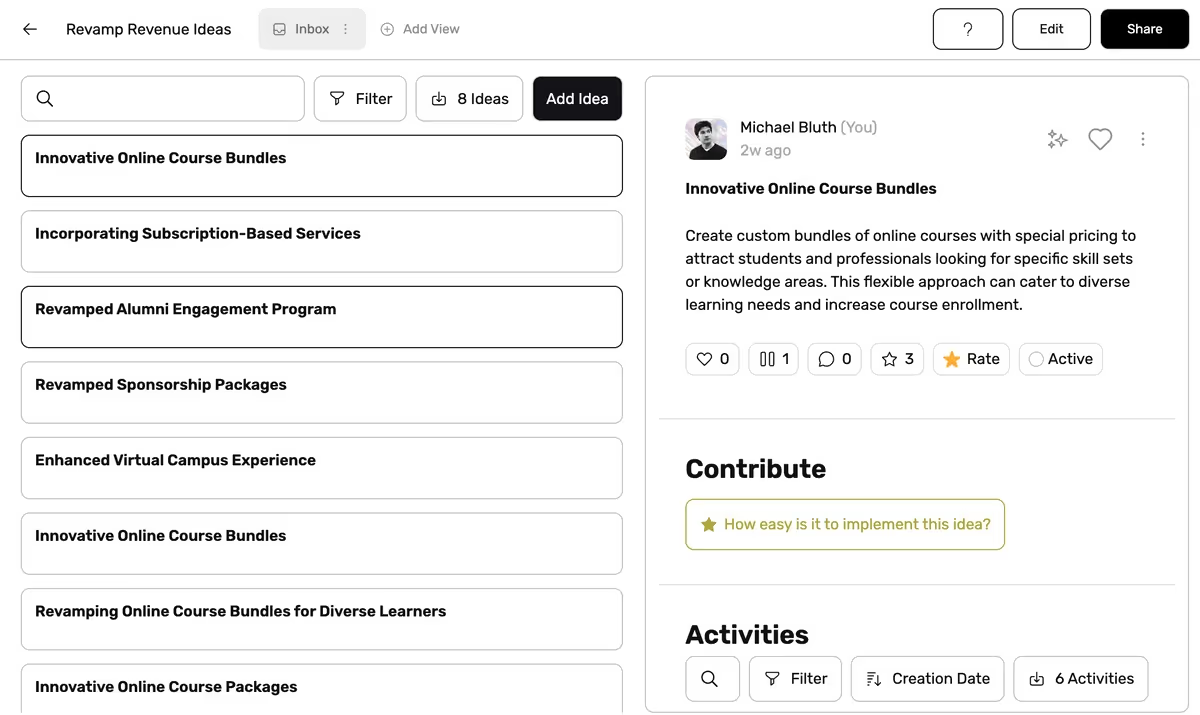
Browse incoming ideas like your email inbox, with a box of headlines to the left and a full view of ideas to the right.
- New Inbox view: A good way to get an overview of new ideas in your idea collections.
- Nested Teams: You can now create subteams of other teams. This makes it easier for you to match the hierarchy of your organization and to set up access to your idea collections.
- Complete overhaul of team settings: You can now drag and drop the relative order of teams, as well as drag and drop them in and out of each other to assign/unassign subteams.
- SCIM Integration: Ideanote now fully supports SCIM (System for Cross-domain Identity Management), an open standard that allows for the automation of user provisioning between software systems, such as between your IT-infrastructure and the Ideanote platform. It enables you to create, update, disable, and delete users and teams from within your own system, such as from a Microsoft Entra ID/Azure AD application you’ve set up internally for usage with Ideanote.
- Data Retention Settings: You can now customize how user-generated content is handled when users are deleted. You can either delete content (the current behavior), preserve it, but dissociate it from the deleted user, or reassign the content to a new user.
- New Accessibility setting: Zoom level. You can now apply a scaling factor to the overall sizing of text and UI elements on the Ideanote platform to improve legibility.
- Improved the experience of typing in several text fields that continuously auto-save changes where the user's input would often be lost while typing and replaced by an old response from the server
- Improved error handling when AI suggestions fail due to unsafe content
- You can now list ideas via the public API using the friendly ID of idea collections instead of full GUIDs.
- Fixed an issue where the Random sorting option would sometimes not work.
- Loosened cycle detection restrictions in automations for improved stability.
- Added a new Sendgrid integration that enables you to use your own SendGrid token and send emails from your own domain on your workspace.
- Added a public API endpoint for extracting ideas for an idea collection via Excel.
- Added a public API endpoint for listing charts for a view, an idea collection, or the entire workspace.
- Shareable links to idea collections with edit rights now first show edit buttons and other sensitive information after the user fully signs up/in.
- The invite dialog now closes automatically after submit.
- General accessibility improvements
- Improved formatting of long phase names in phase selectors.
- Improved formatting of long workspace names in the sidebar.
- Improved the styling of the search button in the sidebar
- Fixed an issue when setting up conditions on Member fields on form entries inside conditional idea fields and automations
- Fixed an issue where phases could not be reordered via drag and drop in their vertical representation.
- Fixed an issue where the tooltip showing the absolute timestamp of an idea would interfere with the stats card for the idea owner.
- Fixed an issue where changing the categories of an existing idea collection template wasn’t possible.
- Fixed an issue where the NPS survey could display while another dropdown or tooltip was open.
- Aggregating on numeric idea fields on charts now work correctly
- Teams are now present inside user excel exports
- Fixed an issue where overriden datetime preferences were ignored.
- Fixed an issue where the default ordering direction of ideas inside views were inversed
- Fixed an issue where slugs for created views could be empty or include non-ascii characters.
- Fixed various issues related importing ideas via CSV
- Other minor bug fixes and improvements
.avif)
Easily import ideas and comment into Ideanote by uploading a CSV or XLSX. from another source.
- Improved layout of workspace settings
- Name and timestamp is now displayed within linked idea summaries
- Resolved an issue where dropdowns were not functioning properly in the Firefox browser
- Improved dark mode support for the date picker for a better user experience
- Moved label and helper text above input fields to make the UI more clear
- Activities are now displayed with friendly IDs and improved text descriptions for easier understanding
- Additional activities have been added to the audit log for a more comprehensive overview of system usage
- Fixed an issue where some users were not receiving email notifications
- The AI autofill button is now hidden when editing ideas to prevent confusion
- "Rating results" and "finished raters" coloums have been added back to the Excel export for improved data visualization
- Minor bug fixes and performance improvements
- It is now possible to search in some dropdown fields
- Added an install app button in the sidebar
- Updated icons for the default evaluation criteria
- Fixed an issue that would cause some users to occasionally experience slow responses from the server.
- Fixed an issue where selecting time range in exports would not work on the insights page
- Added support for wider widget embeds
- The layout has been improved when no data is available for the insight graphs showing a map
- When opening a summary on an idea it now prioritises opening in a way that does not hide the content of the idea
- Fixed an issue where insights would sometimes show that a feature was not available even though it was
- Minor bug fixes and performance improvements
- Added 'Like' support for Idea Collections. Can be toggled on and off via Layout settings.
- Added an option to customize default notification configs separately for guests and members.
- Added improvements to the 'Merge ideas' dialog, including intelligent suggestions of the best Idea Collections.
- Changed Form Entries on Ideas so that clicking them no longer opens the sidebar. Only the the 'expand' icon on them opens the sidebar.
- Added direct Send options for ideas and idea collections.
- Refreshed the "more options" menus.
- Added dedicated Similar Ideas controls in widget settings, letting you choose whether to show suggestions or counts and guiding you through enabling idea exploration.
- Updated idea collection invites with Select All and Unselect All toggles for phases to speed up sharing when many phases are involved.
- Updated geo map analytics with contrasting stroke colors so totals stay readable on colored backgrounds.
- Updated the home logo navigation to clear temporary filters when you return to the overview.
- Fixed idea activity logs that claimed an idea was created with co-owners when it was submitted without them.
- Fixed the profile language experience in the Microsoft Teams app by hiding the Ideanote language picker that couldn’t apply updates there.
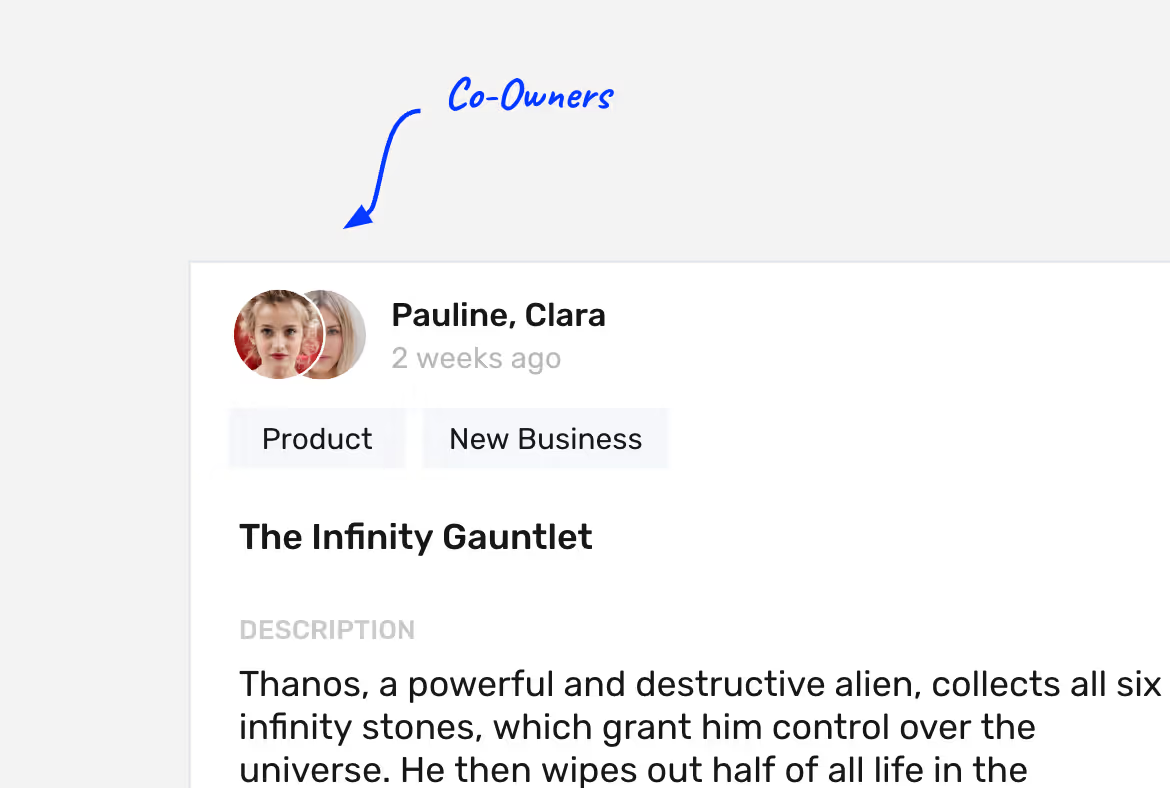
Let multiple people edit and own an idea together. Developing an idea can now happen together!
- Renamed missions to idea collections for a more intuitive onboarding.
- Completely redesigned flow for creating idea collections.
- Redesigned inline editing experience for idea collections.
- Added the ability to associate Goals with idea collections and templates, customizable from workspace settings.
- Improved workspace creation speed.
- Introduced a Private badge on idea collection headers indicating unshared collections.
- Implemented Title Casing on all buttons.
- Improved aesthetics with better default cover images for idea collections.
- Added an Add button to the mission filter toolbar on the homepage.
- Revamped template preview design.
- Added a new colorful gradient background to some loading skeletons.
- Enhanced legibility with better contrast between font colors and background colors, for example on buttons.
- Users can now adjust their preferences for date formatting.
- Resolved an issue where new workspaces couldn't be claimed if their subdomains included non-ASCII characters only.
- Fixed an error displaying incorrect text for template stats.
- Addressed an issue where images in custom emails were served as .webp, which is unsupported in many email clients.
- Corrected an issue preventing dynamic binding suggestions for idea fields from appearing.
- Fixed an issue where searching for Unsplash cover images would sometimes fail.
- Resolved a line height issue for multi-line text fields.
- AI-generation related errors are now handled more gracefully.
- Introducing ChatGPT-powered AI idea generation.
- Updated the 'New' button to 'New Idea' for clarity.
- Resolved an issue with filters not working for undefined idea field values.
- Fixed a problem with custom translations and dynamic data bindings not displaying correctly in all notifications.
- Enhanced tooltips with improved contrast: black background and white text.
- Added the ability to use @-mentions for teams.
- Rectified missing text in notifications for specific activities.
- Fixed a problem with automations using "updated idea mission" triggers.
- Addressed an issue with automations where referencing a user from a "Member" idea field didn't work in certain cases.
- Resolved a problem where team owners lost permission to create missions in workspaces where the policy previously allowed it.
- Fixed an issue where workspace descriptions didn't appear on the login page.
- Moved 'Templates' to a dedicated page accessible via URL.
- Added a toggle to turn of default email footers for branding purposes.
- Updated 'Idea Collection Access' filters for more detailed control on phase or as well as direct invite vs indirect access.
- Updated the 'Send' feature so Members can also send Idea Collections.
- Fixed an issue with checkmark fields inside idea widget when 'Show as dropdown' was enabled.
- Fixed an issue with Idea Collection Access filters used within automations that could sometimes match users across all idea collections.
- Fixed an issue where empty Form Entry summaries could persist on ideas after hiding all idea fields from Layout settings if activities within the phase were locked.
- Fixed a bug where Vote views would show up empty.
- Fixed a bug where Idea Collections with a like could not be deleted.
- Added import/export theme functionality from Theme settings for easily saving the configuration
- Users can now customize what kind of notifications they are interested in from Notification settings
- Fixed an issue that could cause to automations being flagged as cycles when there were many automations with the same trigger configuration
- Fixed an issue where the active view in an idea collection could be clicked to trigger unsaved view warnings
- Fixed an issue where the workspace name could be truncated in the sidebar
- Implemented field-based filtering for form entries.
- Introduced a new setting to define preferred date formatting for workspace, which will be the default for new users, while still allowing individual preference selection.
- Increased maximum resolution and quality for uploaded images and videos post-encoding.
- Added a tooltip to the 'Private' label for idea collections.
- Made UX improvements in the 'Add Idea Collection' flow.
- Implemented minor UX enhancements in the 'Save View' experience.
- Added feature to hide 'Add' button in view layout settings for plot views.
- Optimized display by removing redundant white-space when only the cover image is shown in an idea collection per view layout settings.
- Fixed an issue causing progress bars to incorrectly display as empty.
- General bug fixes and stability improvements behind the scenes.
.avif)
Idea collections work best when they are supporting a company goal. Now, each idea collection will work towards one of the workspace goals. Use the standard goals or define your own to keep your innovation goal-driven and measurable.
- Improved the user import process to automatically create teams when they don't exist, eliminating manual work for enterprise customers
- Fixed an issue where searching for users in chart filters would cause the filter to disappear completely
- Fixed an issue where [object Object] text could appear in deletion warning messages, making it unclear which parts of views were referencing the item being deleted
- Fixed a text overlapping issue in the AI assistant box where content would overlap with buttons and frames
- Minor UI fixes and improvements
- Added a new ‘Show during submission’ toggle for Static fields. When enabled, Static fields with a default value defined will be visible during idea submission.
- Added the ability for users with Full edit access to an idea collection to see and adjust the values of submitted Static fields on existing ideas.
- Added new audit log activities for when login methods are disabled or re-enabled.
- Improved accessibility on the Idea Collection page.
- Improved the footer of emails.
- Updated the description of Static fields to now appear within their tooltips.
- Updated the UI of dropdown menus when a dynamic variable is selected within them.
- Updated the default value field for Static fields of type ‘text’ to be larger.
- Updated the AI prompt max length from 300 to 600 tokens.
- Updated our welcome emails.
- Fixed an issue with setting up Scorecard charts and selecting the ‘Average’ aggregation function.
- Fixed an issue where setting up XY-plot charts could cause a crash.
- Fixed an issue where @-mentions of users with aliases including Unicode or ‘.’ characters would not work correctly.
- Fixed an issue where AI automation steps could produce values wrapped in double quotes.
- Fixed an issue where space theming and default color mode would not be applied on login pages.
- Fixed an issue in ‘Create idea’ automation actions where redundant whitespace in dynamic expressions for categorical data fields could cause empty values.
- Fixed performance issues in large-scale SCIM provisioning.
- Fixed an issue where new sections or new charts in workspace-wide analytics could have an excessively high unique generated number.
- Fixed the ordering of phases inside the ‘View access’ dropdown.
- Fixed an issue where emails could appear without styling in some email clients, like Gmail, depending on the selected font in theme settings.
- Fixed an issue on older versions of Safari where some parts of the application could be empty.
- Fixed UX issues when setting up horizontal bar charts.
- Fixed an issue where date pickers could display month names and weekdays in other languages for users with custom datetime formatting preferences.
- Fixed an issue where idea collections and sections could appear inside the global ‘Add Idea’ dialog for users who did not have access to create ideas in them.
- Added AI Automation Steps, a way to enhance your automations with AI.
- Locked phase settings ("All Activities" and "Ideas and All Activities") now let you lock activities across phases.
- Forms can reference contextual idea or form entry data for dynamic field titles and labels.
- Theme colors are now checked for WCAG compliance with warnings for non-compliant colors.
- You can explicitly select the primary dataset for sorting in multi-dataset List charts.
- The Notification panel now includes a simple filter.
- UI improvements in Vote views for co-owned ideas.
- The UI/UX for setting up Stacked Bar charts has been enhanced.
- Clicking 'Show Translation' now shows a loading state during translation.
- List charts now include rows with a value of 0.
- Form fields have shorter, more manageable IDs for Dynamic Expressions.
- Performance has been improved when retrieving available pricing plans.
- General accessibility improvements have been implemented.
- Fixed a Dutch wording issue in Analytics.
- Fixed an issue where a 'Reply' button appeared on comments for unauthorized users.
- Removed UI references to AI image generation in unsupported regions.
- Fixed overly similar colors in segments of Stacked Bar charts.
- Fixed missing subject lines in email previews for 'Send Email' actions.
- Fixed a broken link in the 'Import CSV' feature in the add people dialog.
- Fixed issues with colors in tooltips.
- Fixed crashes caused by filters like "# of ideas" and "# of likes".
- Fixed inclusion of out-of-range datapoints in custom timeframe charts.
- Fixed subscription management issues in certain languages (e.g., Arabic).
- Fixed crashes in plot views when focusing on date axes.
- Fixed a performance issue when downloading many activities at once.
- Fixed linked ideas not appearing in idea activity lists.
- Fixed rendering issues for buttons in Firefox when managing forms.
- Fixed ordering issues in list views based on phase.
- Fixed the like counter dropping below zero on rapid clicks.
- Fixed an issue in Share where two dropdown menus could be open simultaneously.
- Fixed content overflow when hovering over ideas in plot views or charts.
- Fixed issues when creating or cloning ideas into other idea collections via automations.
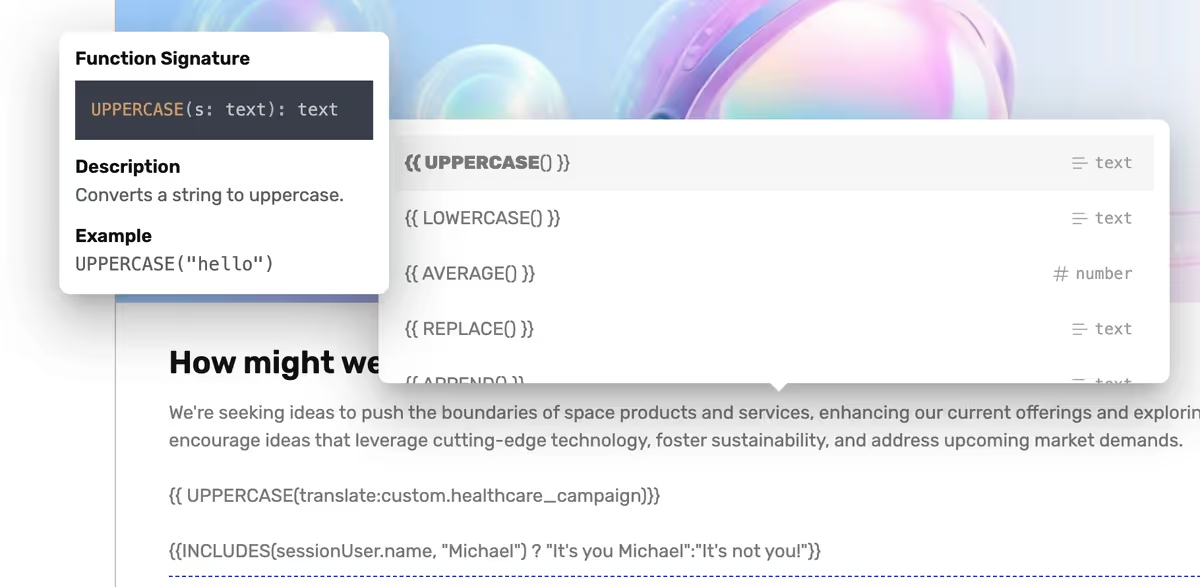
Our Dynamic Binding system has been supercharged and can now do a lot more, including performing operations like idea.stats.likes+idea.stats.views / 5, calling functions e.g. AVERAGE(), and even logical value comparisons. You can use it in the new Static Fields but also across other parts of the platform.
- Improved translations for all languages. Ideanote now fully supports the following 21 languages: English, Czech, Danish, German, Spanish, Finnish, French, Hungarian, Italian, Dutch, Brazilian Portuguese, Slovak, Swedish, Simplified Chinese, Traditional Chinese, Vietnamese, Thai, Turkish, Arabic, Slovenian, Norwegian.
- Added support for color mode customization in the widget
- Resolved a problem where users were unable to unselect any choices after their first selection while setting image choice to a maximum of one choice.
- Replaced the "label" attribute for idea widget fields with a unified title attribute, simplifying the design.
- Resolved a formatting error with certain letters that occurred when using the "translate" button on ideas.
- Fixed an issue with the drop-down list display when selecting a category in the Turning Idea Collection into a Template feature.
- Fixed an issue where the 'is defined' operator could not be used when filtering on member fields
- It's now possible to add section owners to sections. Workspace Owners and Admins can add and rearrange Idea Collections created by or shared with them across all Sections. Additionally, any Member you add as a Section Owner can add and manage Idea Collections created by or shared with them for that specific Section. In general, Members see Sections containing Idea Collections that are shared with them.
- Contextually relevant social link previews will now be shown when sharing an idea collection through a shareable link.
- Added an exit survey for workspace deletion.
- Updated Chinese and Vietnamese translations.
- Magazine view now works for mobile users.
- Moved icon selection into the edit dialog for sections.
- Hid advanced settings for widgets.
- Fixed an issue with the anonymous option missing from the drop-down selection when submitting ideas within the MS Team app.
- Addressed the internal server error on all idea exports.
- Fixed the action/filter dropdown to show specific phase icons instead of general phase-type icons.
- Addressed an issue where user stats wouldn't be shown in all circumstances.
- Added the ability to open child teams while a search or filter is applied on the Teams page.
- Added a deadline indicator when an Idea Collection is close to its end date.
- Updated rating animation to be smoother.
- Updated funnel charts to automatically display phases in their order, even when name is selected.
- Updated Data retention “Keep Content” option to be available to all plans.
- Updated the Inbox view notice element to spans the full width of the left column for better alignment.
- Updated the access mode tooltip to clarify the difference between Full Access and Manage Access.
- Updated translations, including consistent German for “Label”.
- Updated the chart edit dialog to no longer have a “Delete Chart” button in the chart dialog; chart deletion remains available via the more menu.
- Updated Idea Collection level charts to automatically use the Idea Collection start date for timeframes.
- Fixed the Analytics view access settings so they no longer show Idea Collection options in workspace-level views.
- Fixed labels in chart datasets are that were missing.
- Fixed visibility of conditional fields that relate to phases.
- Fixed the access mode to properly restricts visibility of phases when opting out of Full Access.
- Fixed idea limit count to exclude ideas from idea collection templates when counting total ideas.
- Fixed a missing tooltip text for Weighted Rating.
- Fixed a visual glitch where loading elements appeared when the draft sidebar was open.
- Fixed editing of idea template to no longer require a page refresh to work.
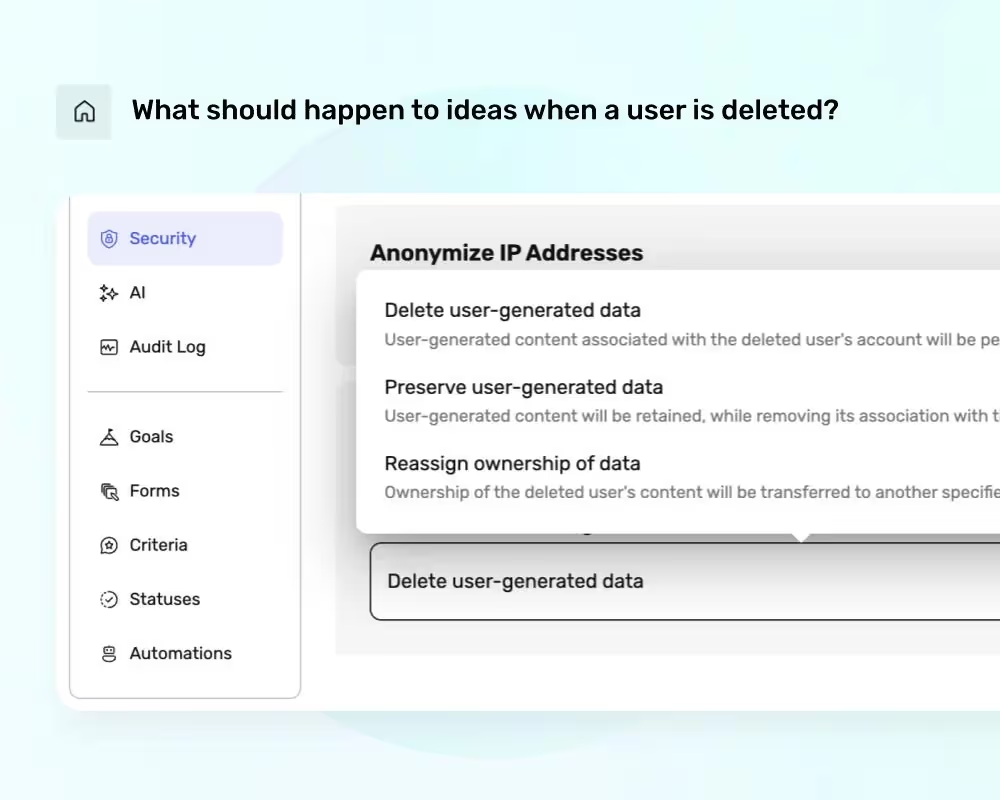
Decide what should happen to ideas and data when a user is deleted. You can choose to delete the data, transfer it or anonymize it.
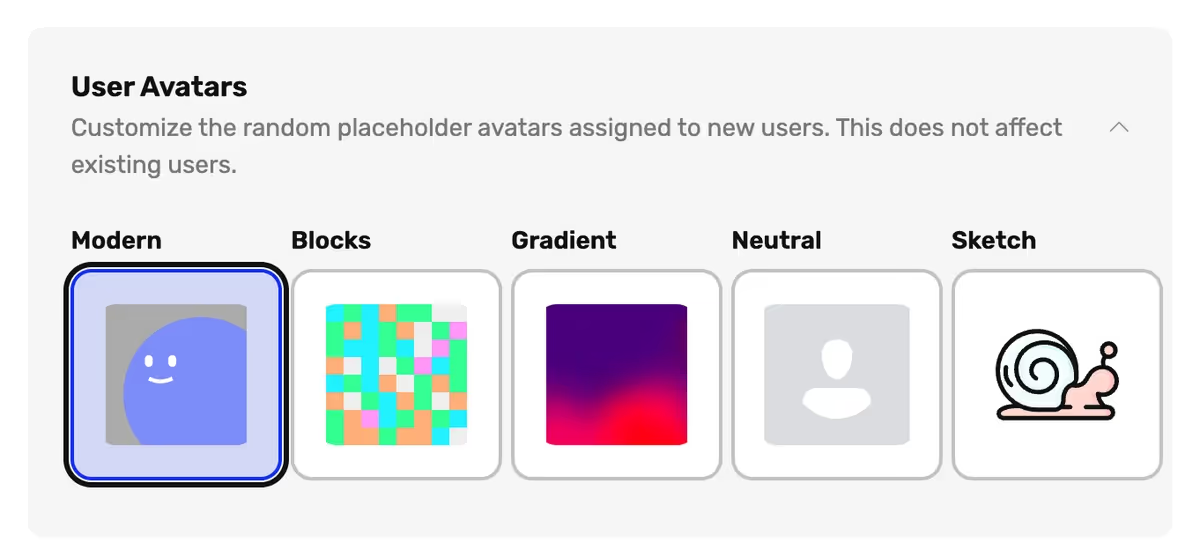
Choose between a selection of user avatar profile pictures that are assigned to new users when they are created.
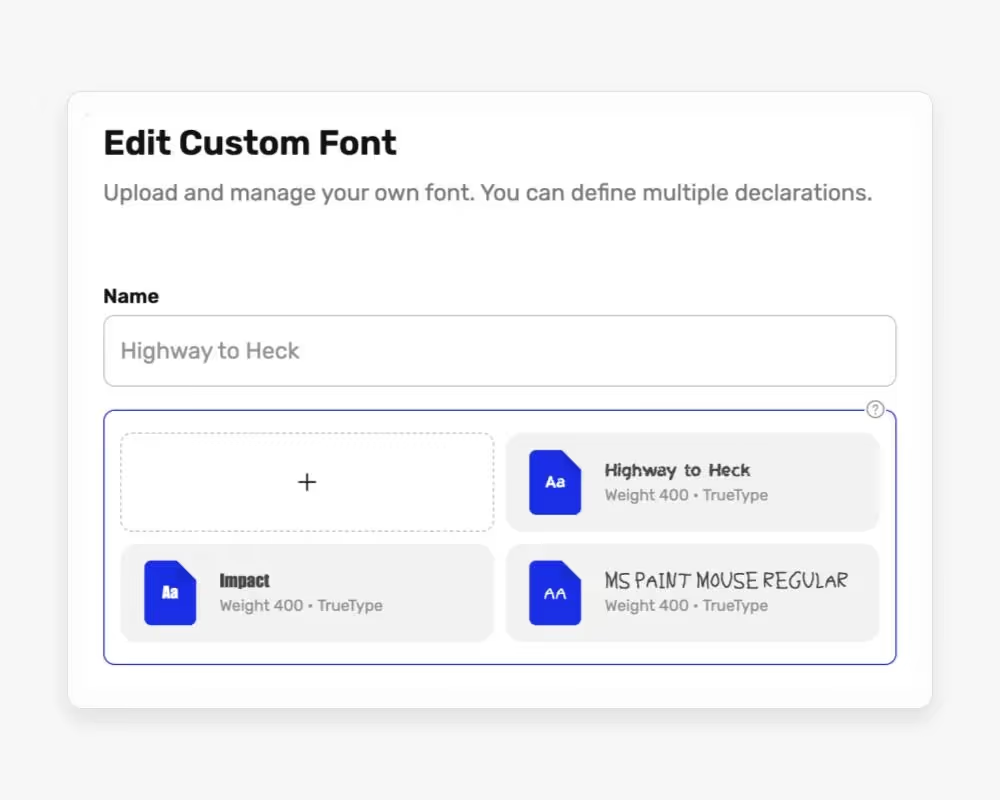
Upload your own fonts if the existing catalog of fonts is not sufficient. In case you wondered how Impact might look on your workspace, now is your chance.
.avif)
Use a rich editor for customizing the content, look, and structure of custom emails sent via in-app automations.
- Added Cluster Views to Idea Collections that can be used to link and analyze ideas.
- Added “Duplicate Phase” and “Duplicate Chart” actions for faster setup and reuse.
- Added “Idea Link” support across automations, custom filters, and dynamic bindings, including a new “New Idea Link” automation trigger.
- Added a “Fullwidth” toggle for all views and a “Max Columns” option (up to 10) for Analytics views to keep layouts consistent across different screens and zoom levels.
- Added multiple Excel export options for Teams, including high-level and detailed membership reports.
- Added the ability to drill down “Avg. Rating” charts by specific criteria (e.g., Ease, Risk) at the workspace level, not just within an idea collection.
- Updated the Similar Ideas experience: the AI autofill button is now a dropdown (AI autofill or open Similar Ideas), the notice only appears for medium/high similarity, and the sidebar can be opened to see low-similarity matches.
- Updated idea collection permission feedback to show a clear error message when access is missing.
- Fixed label positioning and stroke rendering on Funnel charts, including cases where some values are zero.
- Fixed number inputs so entering decimals (e.g., 12.) no longer clears the value or triggers erroneous input events.
- Fixed auto-generated idea titles sometimes using the wrong short text field in list charts.
- Fixed an issue where duplicating an Analytics view inside an idea collection could create both default charts and the source charts.
- Added advanced chart options, including additional time frames (Last 12 Months, This Year, Last Year, This Quarter, Last Quarter), a toggle to include zero-value periods, automatic filling of missing time points, and capping “All Time” to the idea collection’s creation date when scoped to an idea collection.
- Added filter support for data dimensions in charts to make workspace-level reports easier to segment by specific idea collections.
- Updated rating experience with a smoother, slower animation and a clearer default Rating Comment prompt (“What influenced your overall rating?”), now shown as a title with a “Type here...” placeholder.
- Updated translations across the app.
- Changed profile editing behavior so admins and owners can now update user profiles even when profile freezing is enabled in Security settings.
- Changed virtual user handling so the system no longer attempts to create drafts for them.
- Fixed collapsed sections so they remain collapsed when navigating between pages.
- Fixed score field visibility and gradient colors in idea submission forms and widgets across light and dark modes.
- Fixed chart rendering issues.
- Fixed access checks so automations are not incorrectly blocked by access mode.
- Fixed HTML appearing in idea collection columns in Excel exports.
- Fixed color picker when manually pasting in hex colors.
- Fixed broken nested sorting in lists.
- Fixed intermittent waiting behavior when using Global Add Idea button.
- You can now define targets for Line- and Bar charts inside their settings. These will render lines on charts at the values you want and can be customized.
- Added a new ‘Show as bold’ option inside ‘Short Text’ form fields for giving users explicit control over whether to present with bold formatting or not on submitted ideas and form entries.
- Attempting to delete a goal will now produce a warning when an idea collection refers to it.
- Fixed an issue where templates would count towards the idea collection limit
- Fixed an issue where no autocomplete suggestions for dynamic variables would be presented for Static fields inside automations
- Fixed an issue where editing an idea with a ‘Text list’ field would delete its content.
- Fixed an issue where newlines in ‘Send Email’ would produce double newlines in emails.
- Added a Clear Draft button inside the Add Idea dialog when there is a pre-existing draft
- Added a reference to the title of the idea collection inside the Add Idea dialog.
- Added the ability for users without editing access to an idea collection to view the dropdown of Phase progress of an idea
- Added missing padding to some scrollable dialogs
- Added a missing toggle inside layout settings.
- Added an info tooltip next to rating criteria when seeing the rating results for an idea where the details of the criteria can be read
- Improved the text of the Turn into Template button
- Aligned how unnamed sections are displayed
- Updated the default space cover images
- More idea collections are loaded by default on the home page
- Fixed an issue where dropdown would stay open after selecting an option
- Fixed an option where clicking an @-mention was not working
- Fixed an issue where the list of liked ideas on the profile page would load endlessly
- Minor UI improvements
- Added better search and highlight in dropdowns
- Fixed an issue where using a new version of a browser would show up as a new session in the session overview
- The update idea content activities now show up correctly on the platform
- Extended the widget with more advanced features
- Fixed an issue where selecting a date range would be shown in a wrong format
- Added theme color changes when installing the web app
- The world map in insights is now more stable
- Added the ability to upload logos to automations and toggle 'Show name' in their settings.
- Added support for applying the Notification 'Workspace Defaults' to users as a bulk action inside People settings.
- Added support in View Layout settings to let you choose not only whether action prompts are shown, but from which phases exactly.
- Updated wording of activities and notifications triggered via automations to be more neutral.
- Updated design of the Profile dropdown for easier access to language, color mode, and other personal settings.
- Fixed an issue related to SCIM-provisioning when used with the 'Freeze Profiles' security setting.
- Fixed an issue where SCIM-provisioning failed if the user who originally set up the integration had been demoted.
- Fixed an issue where SCIM-provisioning didn’t work with email addresses containing mixed-case characters.
- Fixed an issue where dragging and dropping an image into an Information view would not work.
- Fixed an issue where deleting the last attachment on an idea via the edit dialog triggered an error.
- Fixed an issue where updating the logo for a section failed.
- Fixed an issue where toggling 'Synchronize Team' inside SAML login provider settings didn’t persist after reload.
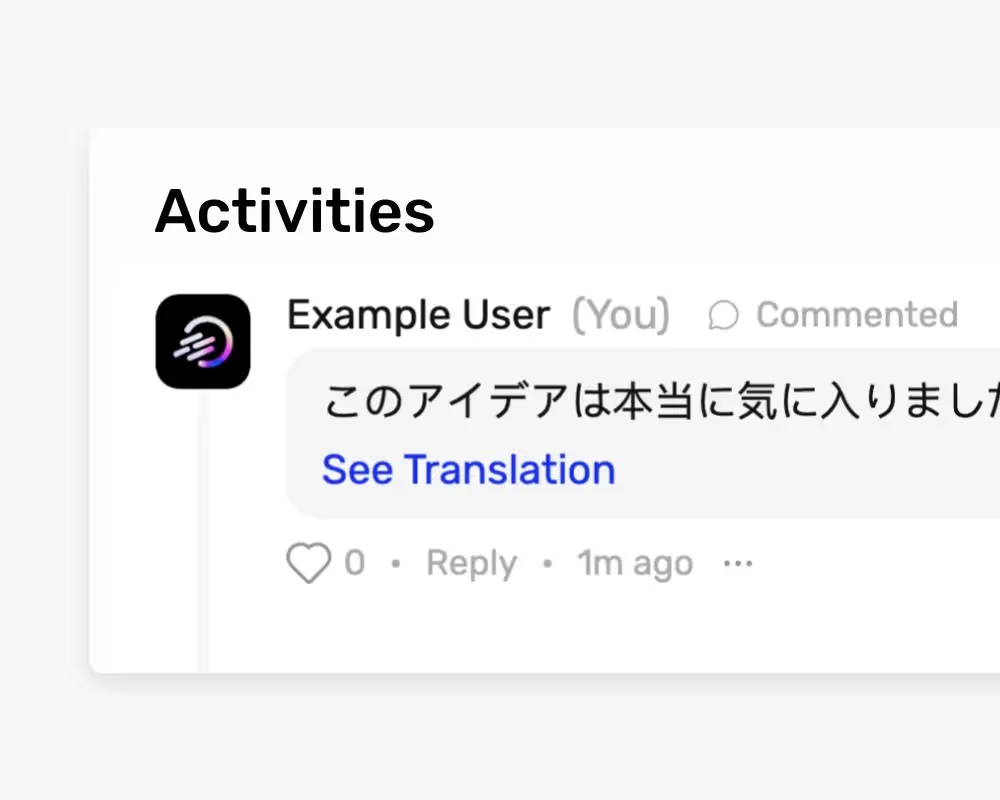
Allow users to Show Translations for comments, not just for idea content.
- Added an option to enforce vertical or horizontal layout of charts
- Added the ability to bind to parent comments inside dynamic bindings in automations
- Added template activities for the audit log
- Improved the layout of Idea cards in Trends
- Tile widgets have been renamed to 'Inline'
- Minor bug fixes and improvements
- Added a new automation action that can be used for creating custom notifications for users.
- Workspaces can now choose between a selection of user avatar styles that will be assigned to new users when they are created.
- View slugs are now more robust when handling non-ASCII characters.
- The "Add" button in idea collections is now "Add Idea" instead.
- Disabled tabs inside workspace settings are now hidden for users who can’t access them.
- Fixed an issue where some users could not delete their personal idea collection templates.
- Fixed an issue where clicking "Load more" inside some dialogs would close the surrounding dialog.
- Fixed an issue where the NPS survey could display in places it shoudn’t.
- Minor bug fixes and improvements
- Added 'Duplicate' option for Automations.
- Extended the maximum delay for Automation triggers to 12 months.
- Introduced Arabic (LTR) as a new language option.
- Added toggle to anonymize IP-addresses collected for Audit Log
- Private label now features a tooltip with a share button.
- Adjusted heights on some dialogs for improved user interface.
- Resolved several issues related to publishing and cloning templates.
- Fixed a problem where duplicate options would appear in some dropdown menus.
- Corrected an error causing duplicate rows in Excel exports for some sorting selections.
- Rectified an issue where some UI labels would disappear.
- Going forward, when an idea is moved to a Review phase, potential existing reviews for the idea in that phase are reset.
- Fixed a server error caused by applying a filter on the goal of an idea collection.
.avif)
Save time by setting up your own innovation dashboard with completely customizable widgets.
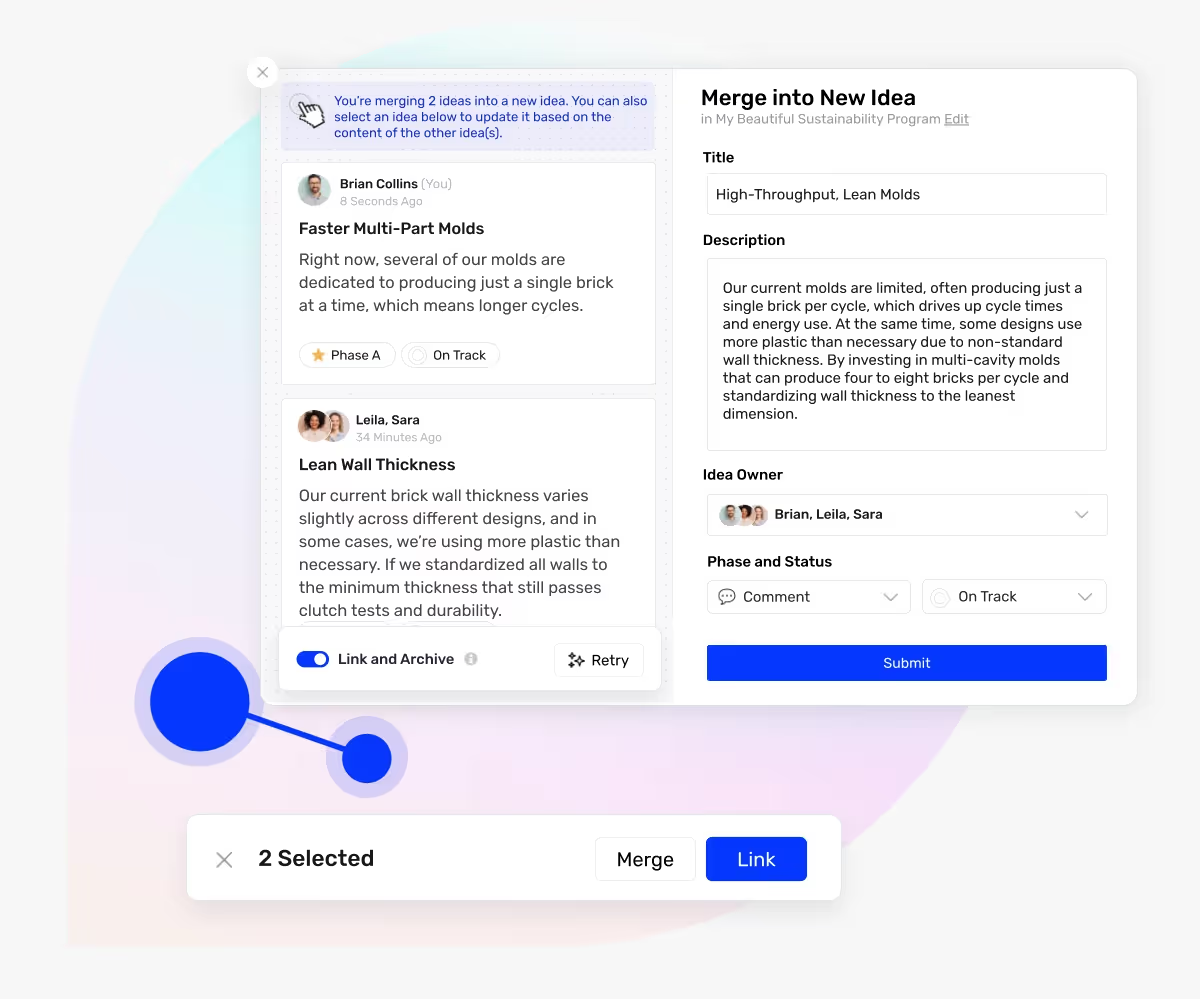
Combine selected ideas into one with AI, while keeping the form intact.
- Added search support to the country selection dropdown in the Train AI settings
- Implemented a wide range of accessibility improvements for enhanced usability on screen readers
- Improved text visibility in dark mode
- Improved the behavior of the resize button in Information views
- Updated the display of idea owners on partly anonymous ideas for editors in list views
- Changed checkmark-, dropdown-, image choice-, and select-fields in forms to show a warning when deleting an existing option, indicating that any content referencing that option will be lost
- Fixed a UX issue where an existing user could appear in the Share dialog as if they could be invited to the Workspace
- Fixed an issue where phases and views located inside templates could be selected in workspace-wide dropdowns, such as within filters
- Fixed an issue in Information views where videos could sometimes flash
- Fixed an issue in Inbox views when the ‘Hide IDs’ layout option was disabled
- Fixed an issue where loading skeletons could appear while submitting an idea
- Fixed an issue where duplicating an Analytics view wouldn’t include its charts
- Fixed a rare authentication-related issue when a user is deleted with the ‘Keep Content’ data retention policy is enabled
- Fixed an issue where selecting ‘Is Defined’ in conditional fields for an Attachment field would always revert to ‘Is not defined’
- Full timestamps for ideas are now shown inside a tooltip on hover.
- Reviews, review results and form entries are now included in advanced excel exports for ideas
- Improved on the structure and consistency of excel exports for ideas.
- Made the autocomplete dialog inside automations wider so it wraps text less often.
- Automations scoped to missions can now optionally decide to run their automation actions in other idea collections for some types of actions like ‘New idea’. This enables workflows where incoming ideas can be copied to other idea collections, possibly with modifications.
- Automations with an idea (or idea-related) trigger can now optionally apply their related automation actions on other ideas. In the past, these were locked to only apply to the idea that triggered them.
- Autocomplete suggestions pointing to idea fields inside automations now show the title of the field directly as the user is typing, so they can quickly understand which idea field it relates to.
- Updated the layout of the "Forms" settings page to align with other settings pages.
- Allowed for ordering by creation date for more types of entities.
- Fixed an issue where goals could not be deleted if an idea collection template referenced them.
- Fixed an issue where some members could access People settings without having the necessary rights.
- Fixed an issue where contents for "Member" idea fields would not show inside List views.
- Fixed bugs related to ratings inside advanced excel exports for ideas where it could show the same ratings multiple times.
- Fixed an issue where dynamic bindings could not be bound to attachment fields inside automation actions.
- Fixed an issue where autocomplete suggestions inside automations were not always correctly truncated, leading to very long and difficult to read strings.
- Fixed an issue where the autocomplete suggestions inside automations would incorrectly suggest fields from the target mission when binding to fields on the trigger mission in "Create Idea" and "Update Idea" automation actions.
- Fixed an issue where the autocomplete suggestions inside automations would not refresh when the user selected a different idea collection.
- Fixed an issue with applying dynamic bindings to checkmark fields.
- Fixed the dynamic binding type of options for radio-, image choice, checkmark and dropdown fields such that they appear as "text" instead of "ID".
- Fixed an issue where the autocomplete suggestions for automations could sometimes show the word "mission" instead of "ideaCollection".
- The Review phase has been redesigned, offering more control over the acceptance or rejection of ideas.
- Statuses can now be reordered effortlessly using drag'n'drop.
- Users' email addresses can be updated by adding a new_email column to a CSV and importing it via the Invite people dialog.
- Deep-linking is now available within the Microsoft Teams Integration.
- You can now view the Idea ID directly from List Views.
- Enhanced the performance for AI-generated content, reducing wait times.
- Increased the number of ideas displayed in the Most Ideas Ideas insight.
- Fixed an issue where AI-generated images were not displaying correctly.
- Resolved a bug causing the text Empty to appear during idea submission.
- Addressed an issue causing incorrect shareable links within the Microsoft Teams integration.
- Fixed a login issue experienced in the desktop client of the Microsoft Teams integration.
- The unnecessary sign-up button no longer appears on the login page under certain conditions.
- Account owners can now schedule workspace deletions.
- You can now filter ideas inside idea filters based on form entry fields.
- Cover images for Idea Collections are not AI-generated when using the 'Standard' template.
- Image attachments on generated AI ideas are now AI generated.
- Sorting the Teams column is now possible within the Members overview.
- Number of Comments, Number of Ratings, and Number of Form Entries filters now allow specifying the phase.
- Idea Collection Access filters now include the option to filter based on user contribution to a specific phase.
- Improved German translations.
- Rounding of UI elements has been refined.
- User experience enhancements to creating new idea fields.
- Fixed an issue where operators could be ignored on Member idea fields.
- Fixed an issue with incorrect cloning of View Accesses for Templates.
- Fixed an issue where dynamic bindings referencing idea fields were not replaced correctly inside Templates.
- When changing the category on an automation action, the accordion menu will now remain open.
- The simple idea collection filter now displays only relevant sections to the user.
- Automation triggering based on an idea meeting its Review threshold is now possible.
- Various bug fixes and UI improvements for filters and automations.
- Fixed an issue where rating icons could appear too small.
- Shareable links from the Microsoft Teams application now deep link into the Teams application.
- Improved dark and high contrast mode.
- Cards and toasts now have a more prominent display.
- Increased the number of automations loaded at a time in automation settings.
- Hovering over the status chip at the bottom of idea cards now reveals the full status of an idea.
- When changing the idea status, the existing status is shown inside the dialog if it is of the same kind.
- User experience improvements to the Add Idea Collection flow.
- When navigating back from an empty idea collection, users are now prompted to either keep or delete it.